Post

Reverse Engineering for Beginners : Floating-point unit(Part2)

Reverse Engineering for Beginners : Floating-point unit(Part2)

1.25.7 Comparison example


Let's try this:

C

#include <stdio.h> // include standard I/O header

double d_max (double a, double b) // define function returning the larger of two doubles
{
    if (a>b)      // check if a is greater than b
        return a; // return a if condition is true
    return b;     // otherwise return b
};

int main() // program entry point
{
    printf ("%f\n", d_max (1.2, 3.4)); // print max of 1.2 and 3.4
    printf ("%f\n", d_max (5.6, -4)); // print max of 5.6 and -4
};


Even though the function is simple, understanding it at the Assembly level will be a bit difficult.


x86

Non-optimizing MSVC

MSVC 2010 produces the following:

Listing 1.214: Non-optimizing MSVC 2010

Assembly

PUBLIC _d_max

_TEXT SEGMENT

_a$ = 8  ; size = 8 ; parameter a offset on stack
_b$ = 16 ; size = 8 ; parameter b offset on stack

_d_max PROC
    push ebp                        ; save base pointer
    mov  ebp, esp                   ; set up stack frame

    fld  QWORD PTR _b$[ebp]         ; load b (8 bytes) from stack into ST(0)
    ; ST(0) = _b

    fcomp QWORD PTR _a$[ebp]        ; compare ST(0) with _a, then pop ST(0); sets C3/C2/C0 bits
    ; compare _b with _a and pop
    ; stack is empty here

    fnstsw ax                       ; copy FPU status word into AX (C3/C2/C0 bits land in AH)
    test ah, 5                      ; test bits 0 and 2 of AH (C0 and C2); 5 in binary = 00000101
    jp   SHORT $LN1@d_max           ; jump if parity flag set (means b >= a or b == a)

    ; we reach here only if a > b
    fld  QWORD PTR _a$[ebp]         ; load a into ST(0) to return it
    jmp  SHORT $LN2@d_max           ; jump to epilogue

$LN1@d_max:                         ; label reached when b >= a
    fld  QWORD PTR _b$[ebp]         ; load b into ST(0) to return it

$LN2@d_max:                         ; function epilogue
    pop  ebp                        ; restore base pointer
    ret  0                          ; return (result is in ST(0))
_d_max ENDP


FLD loads _b into ST(0).

FCOMP compares the value in ST(0) with the value of _a and sets the C3/C2/C0 bits in the FPU status word register. This is a 16-bit register that reflects the current state of the FPU. Also, FCOMP after the comparison pops the value from the stack. And that is the difference between it and FCOM which only compares without popping.

And I will explain to you simply why things are a bit complicated here. Processors before Intel P6 had no jump instructions that could test C3/C2/C0 directly, because back then the FPU was a separate chip.

Modern processors now have:

Assembly

FCOMI   ; compare ST(0) with ST(i) and set CPU flags directly (ZF / PF / CF)
FCOMIP  ; compare, set CPU flags, and pop ST(0)
FUCOMI  ; unordered compare and set CPU flags (handles NaN without exception)
FUCOMIP ; unordered compare, set CPU flags, and pop ST(0)


And these instructions modify the CPU flags directly (ZF / PF / CF).

FNSTSW copies the FPU status word into register AX. The C3/C2/C0 bits are placed at positions: 14 / 10 / 8 β€” meaning they all reside in the high part of AX which is AH. And so we understand AH, because AH takes bits 8 to 15, and AX is 16-bit, so they are all confined to the AH side.

ConditionC3C2C0
b > a000
a > b001
a = b100
error (NaN etc.)111

This is how the C3/C2/C0 bits are positioned in the AX register.

1

This is how the C3/C2/C0 bits are positioned in the AH register.

2

After executing the instruction:

Assembly

test ah, 5  ; AND AH with 00000101 (binary); isolates C0 (bit 0) and C2 (bit 2), ignores all others


Only the two bits C0 and C2 (at positions 0 and 2) are taken into consideration, and all other bits are ignored.

Now let's talk about the parity flag, which is another notable historical artifact.

The parity flag is set to 1 if the number of 1s in the result of the last arithmetic operation was even, and set to 0 if it was odd.

And the author at that point went and checked Wikipedia:

A common reason to test the parity flag is actually unrelated to parity itself. The FPU has four condition flags (C0 through C3), but they cannot be tested directly and must first be copied to the flags register. When this happens, C0 is placed in the carry flag, C2 in the parity flag, and C3 in the zero flag. The C2 flag is set for example when incomparable floating point values (such as NaN or unsupported format) are compared using FUCOM instructions.

As stated in Wikipedia, the parity flag is sometimes used in FPU code. Let's see how.

The PF flag is set to 1 if C0 and C2 are both 0 or both 1, and in that case the instruction JP (jump if PF==1) will execute.

If we recall the C3/C2/C0 values for the different cases, we can see that the conditional jump JP will execute in two cases:

* if b > a

* or if a = b

(Because the C3 bit is not taken into consideration here, as it was zeroed out by test ah, 5).

After that the matter is simple. If the conditional jump happened, the FLD instruction will load the value of _b into ST(0). And if the jump did not happen, the value of _a is what will be loaded there.

What about checking C2?

The C2 flag is set in case of an error (such as NaN, etc.), but our code does not check it. If the programmer cares about FPU errors, additional checks must be added.

First OllyDbg example: a=1.2 and b=3.4

We will start by compiling the C code using this command:

Shell

cl /Od /Zi /arch:IA32 test.c  ; compile with no optimization, debug info, targeting IA32


Then we will run the exe on x32dbg, go to symbols, and select the function named d_max.
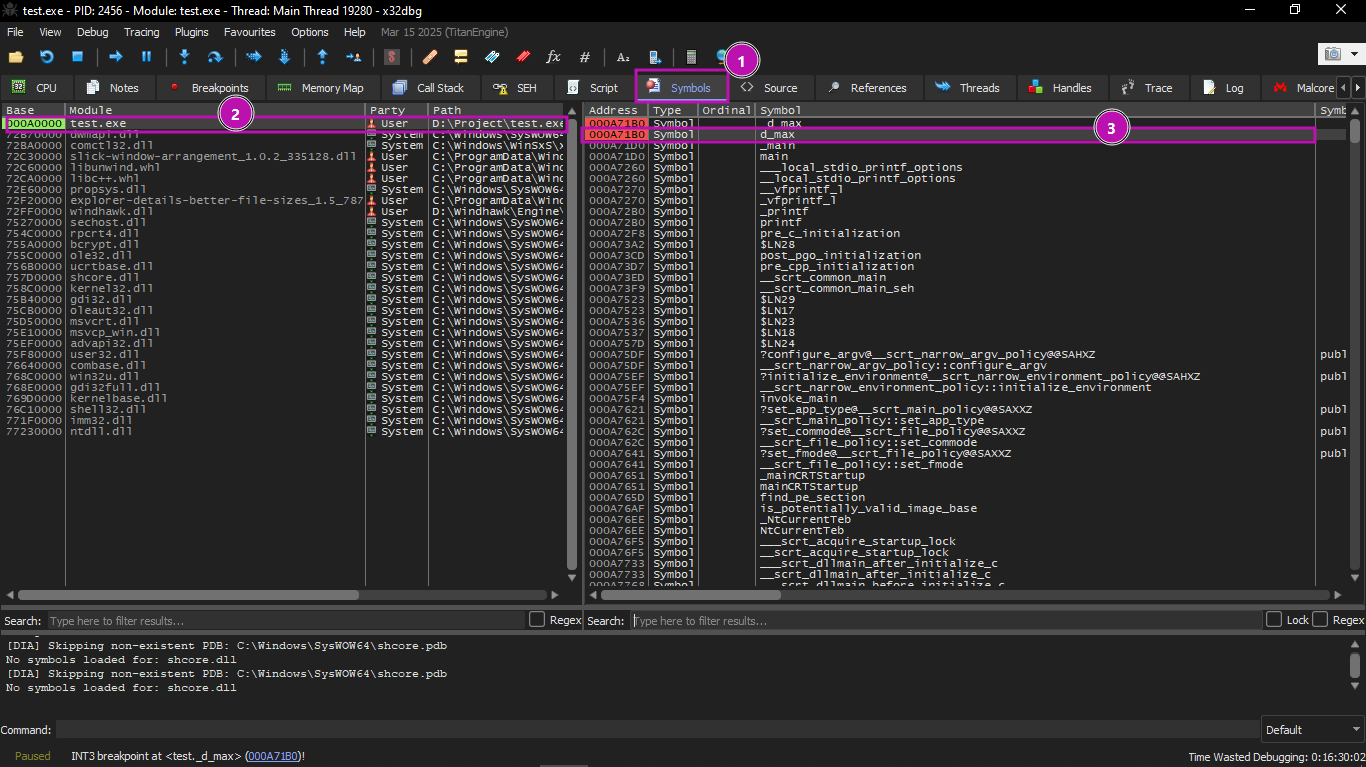
fpu_1

We will set a breakpoint at the beginning of the function, press F9 until we reach it, and then start stepping with F8.

We will start executing the first FLD:
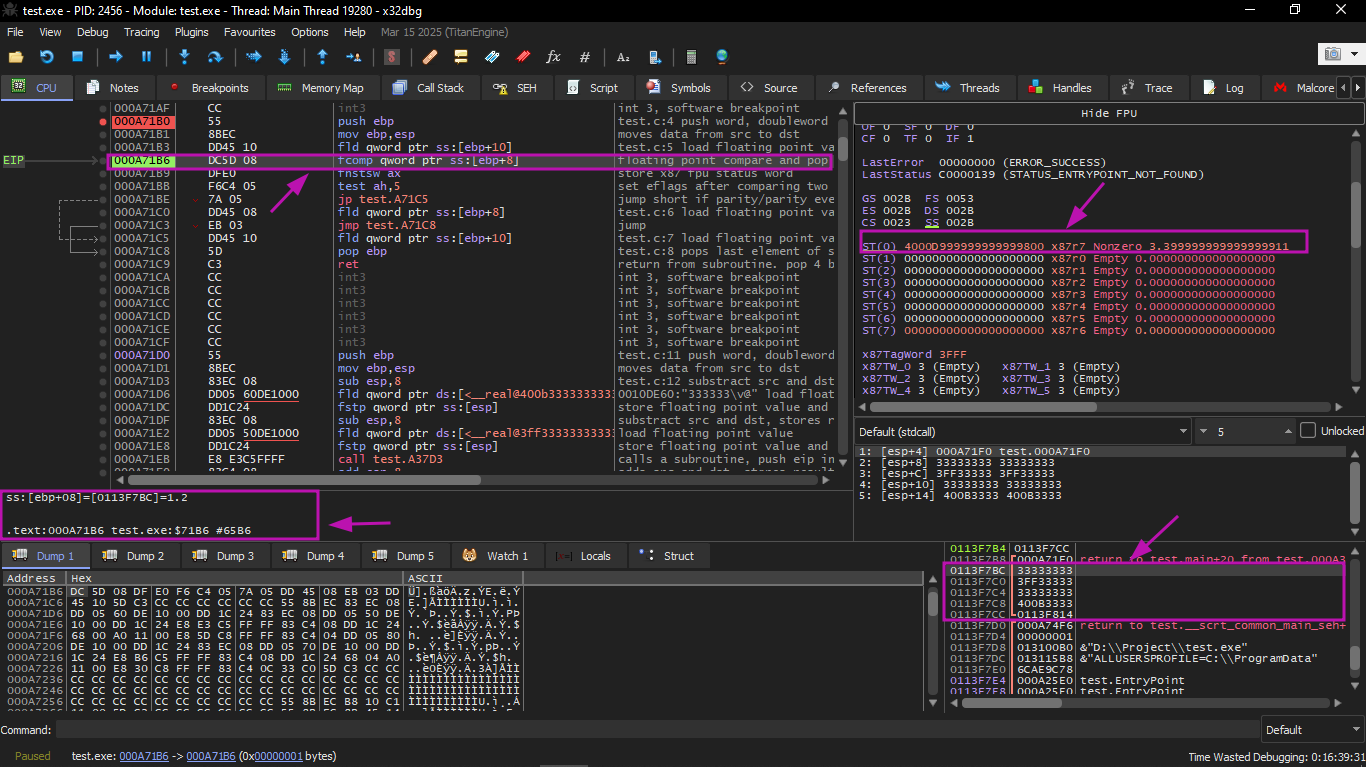
fpu_2

The current function arguments are: a = 1.2 and b = 3.4 (we can see them in the stack: two pairs of 32-bit values). The value b (3.4) is already loaded in ST(0). Now FCOMP is about to execute. x32dbg displays the second operand of FCOMP, which is currently on the stack.

FCOMP was executed:
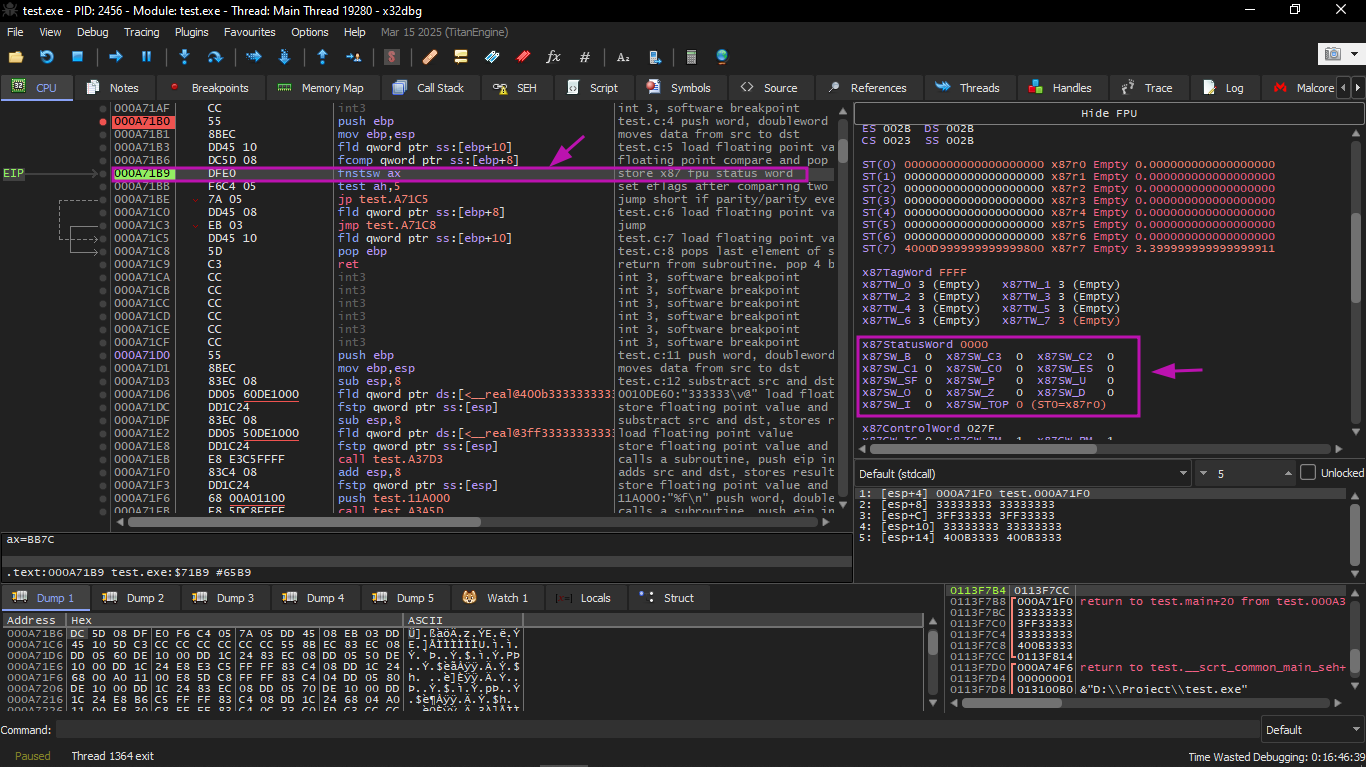
fpu_3

We see the state of the FPU condition flags: all zeros.

FNSTSW was executed:
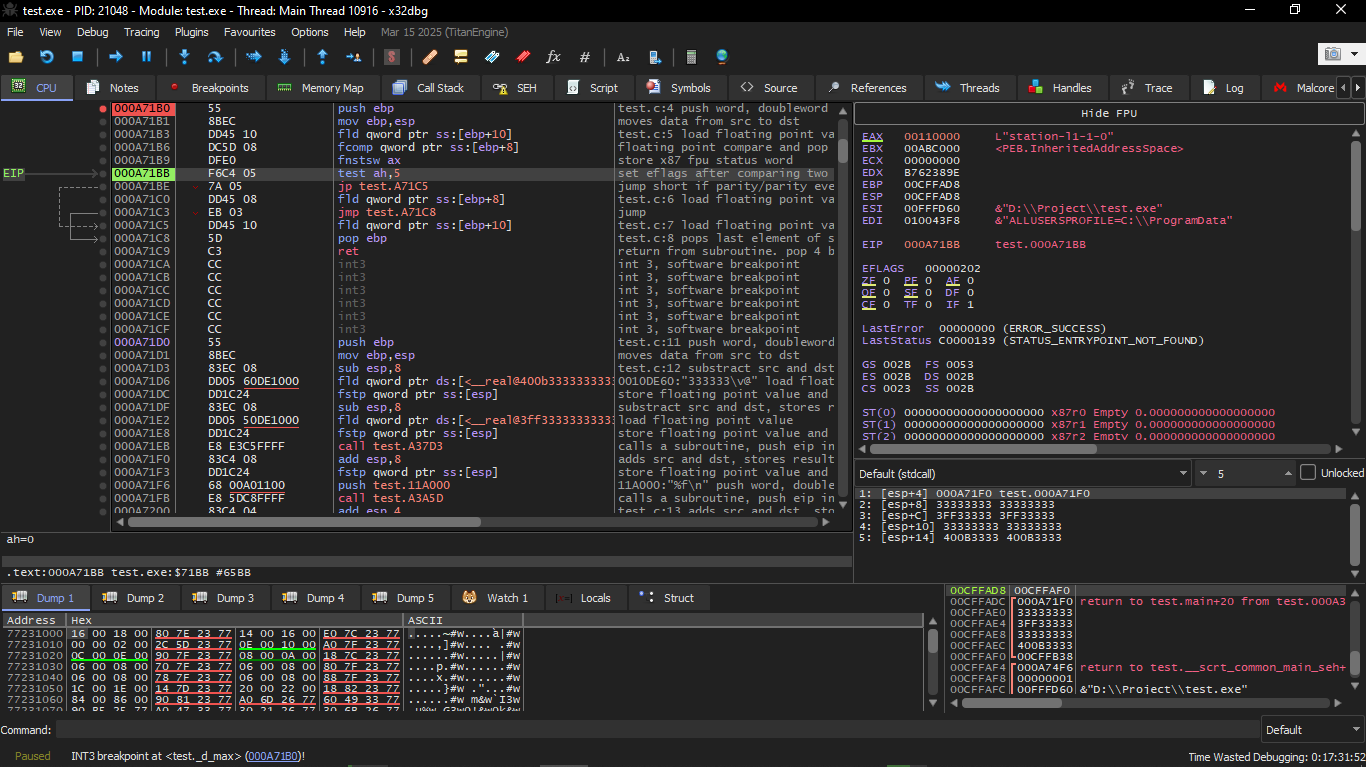
fpu_4

We see that register AX contains zeros: indeed all condition flags are zero. (OllyDbg decodes FNSTSW as FSTSW β€” they are synonyms).

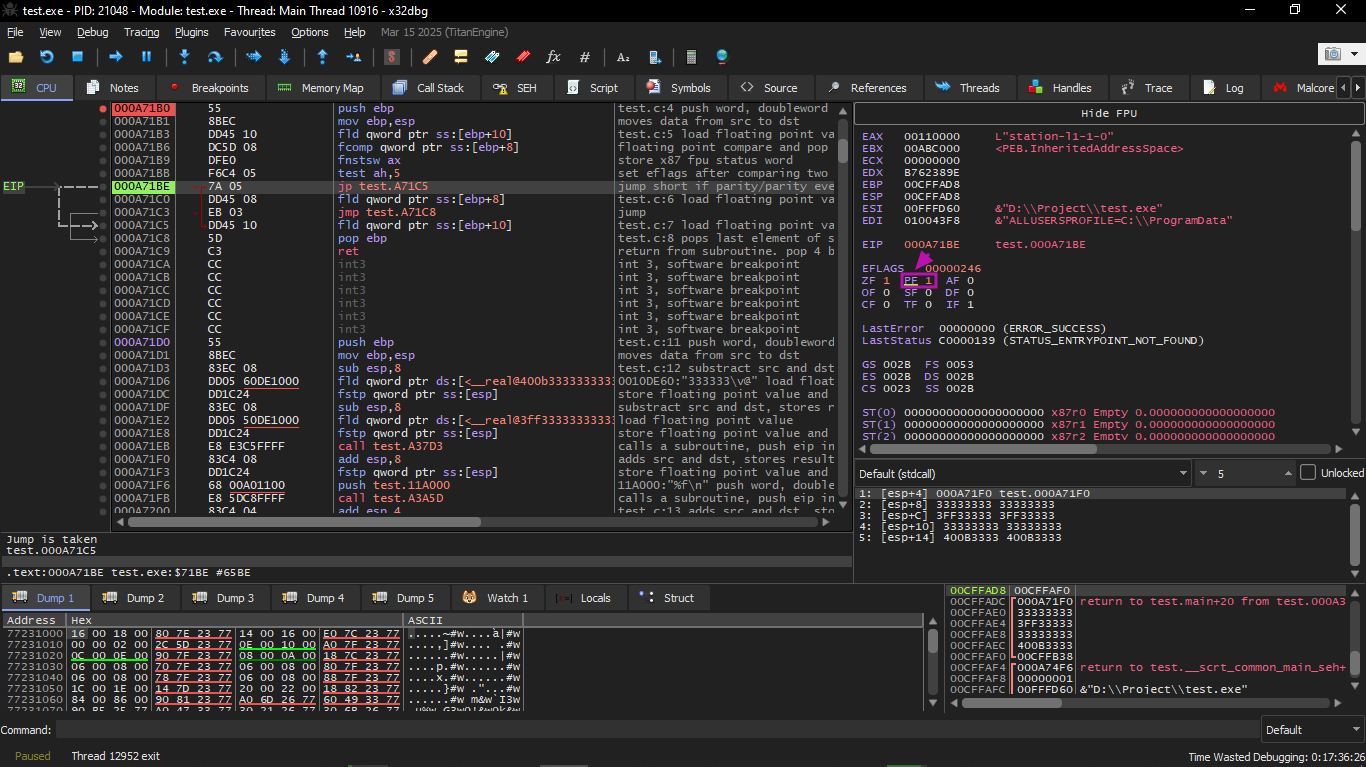
TEST was executed:
fpu_5

The PF flag is set to 1. Indeed: the number of set bits in 0 is 0, and 0 is an even number. x32dbg decodes JP as JPE β€” they are synonyms. And it is about to execute now.

JPE executed, and FLD loaded the value b (3.4) into ST(0).


Second OllyDbg example: a=5.6 and b=-4

Let's do a second example:
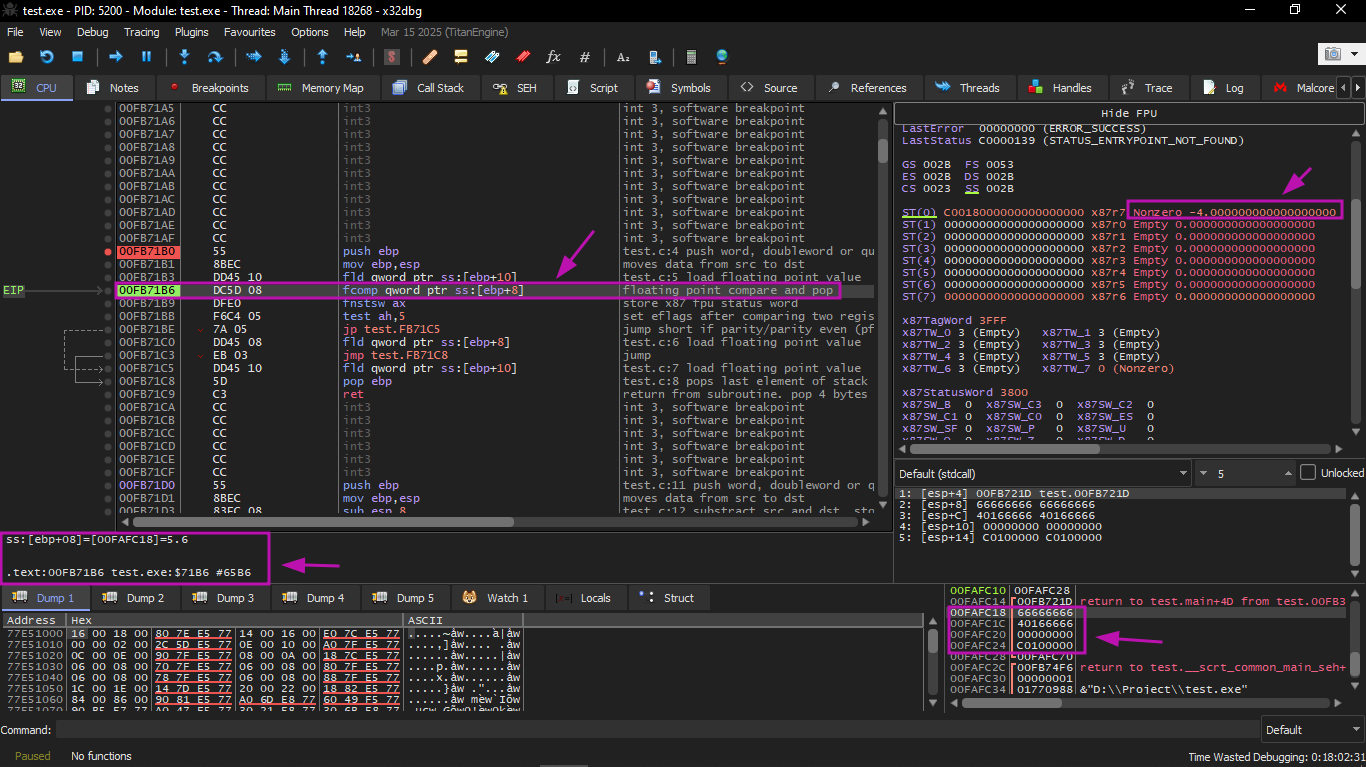
fpu_6

The current function arguments are: a = 5.6 and b = βˆ’4. The value b (βˆ’4) is already loaded in ST(0). FCOMP is about to execute now. x32dbg displays the second operand of FCOMP, which is currently on the stack.

Then we will execute FCOMP:
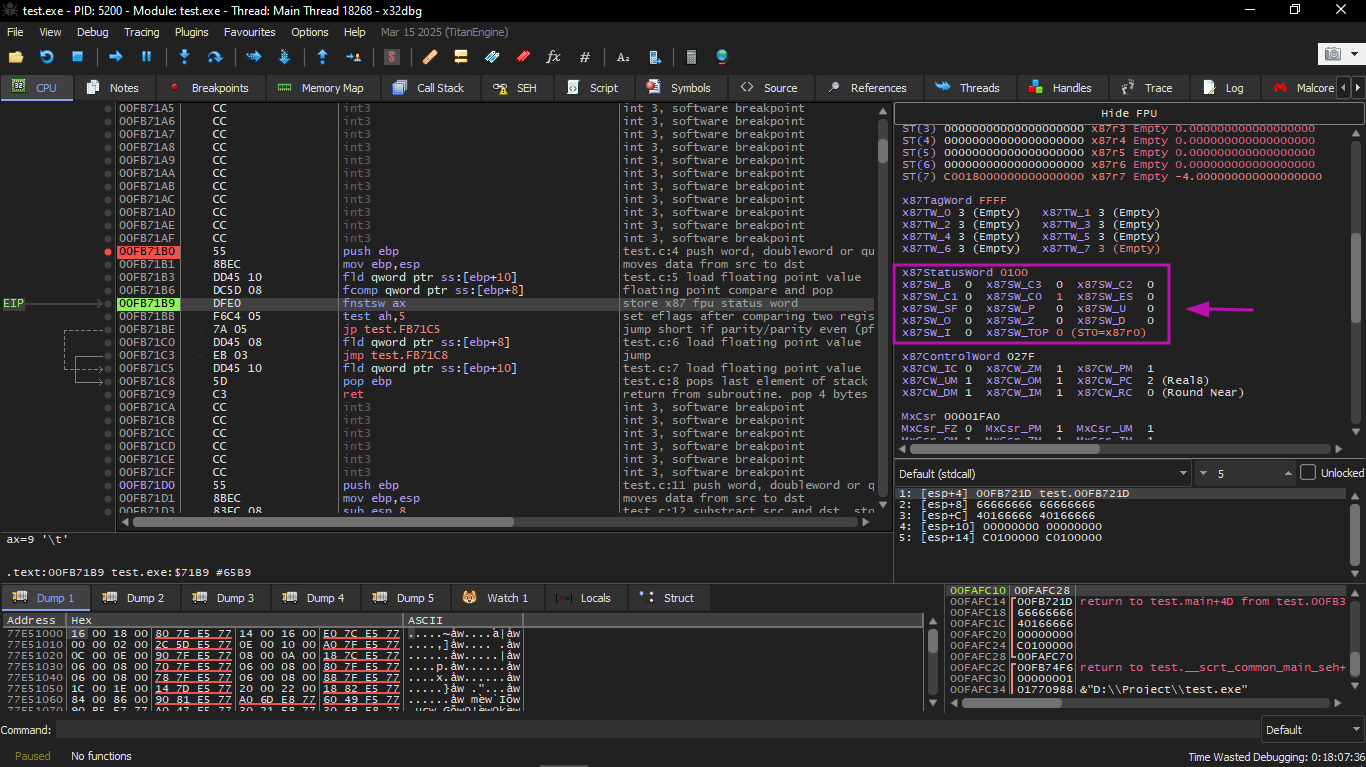
fpu_7

We see the state of the FPU condition flags: all zeros except C0.

Then FNSTSW will execute:
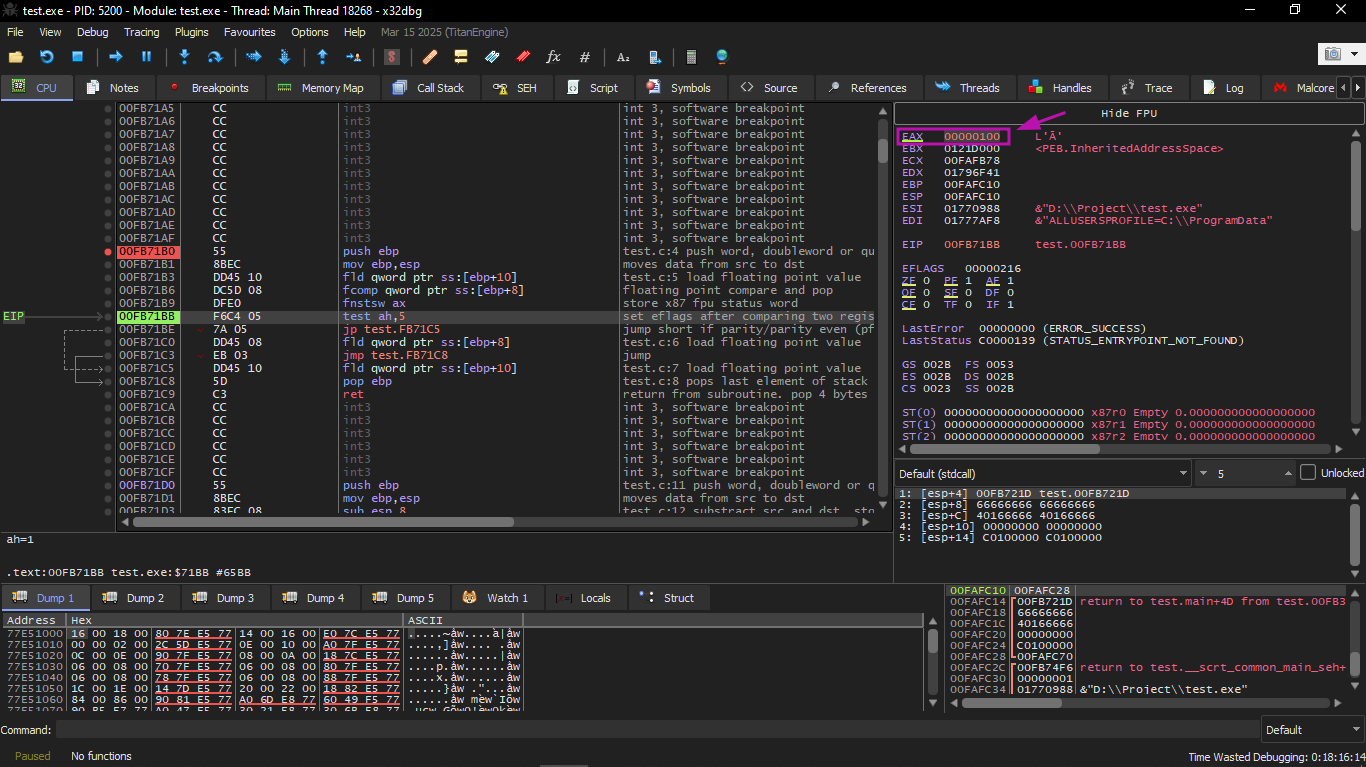
fpu_8

We see that register AX contains 0x100: the C0 flag is present in bit number 8.

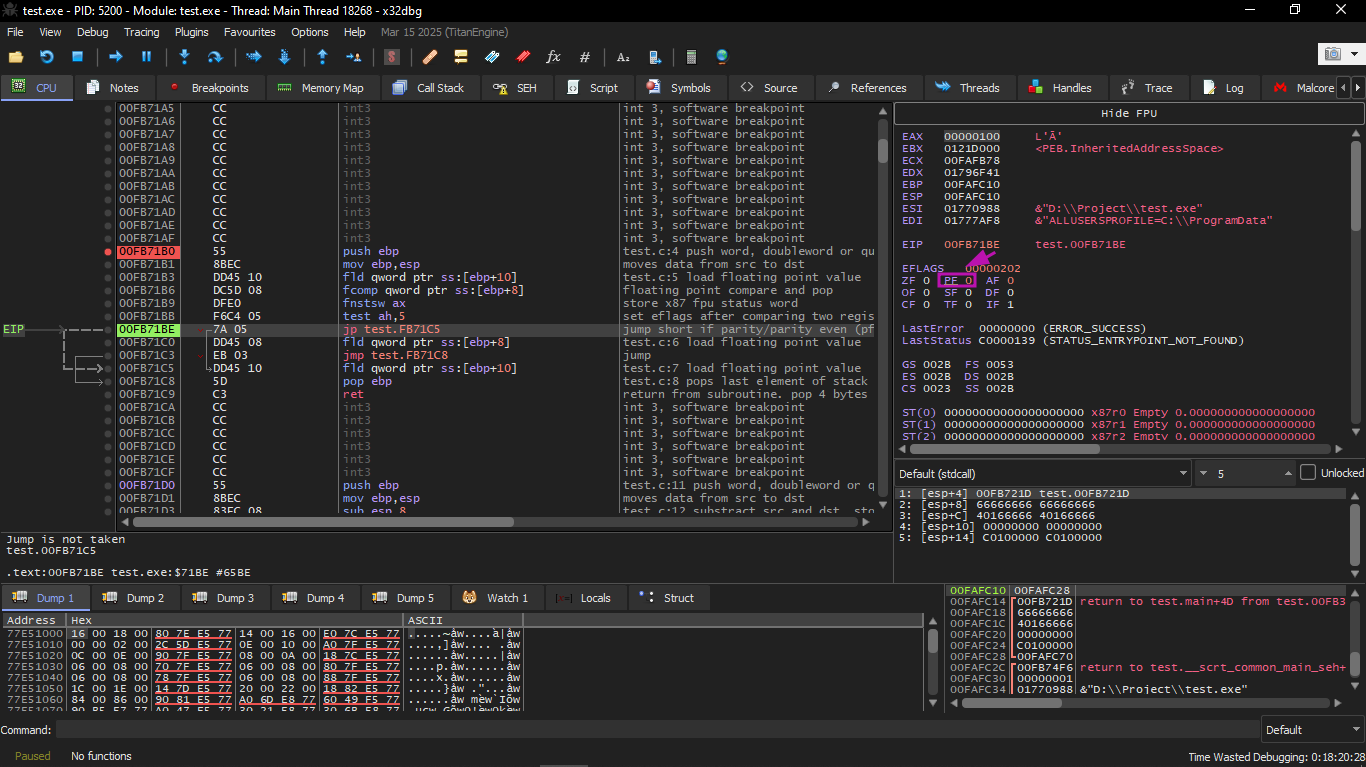
Then we will execute JP:
fpu_9

Here you will find that the PF flag is zeroed. Indeed: the number of set bits in 0x100 is 1, and 1 is an odd number.

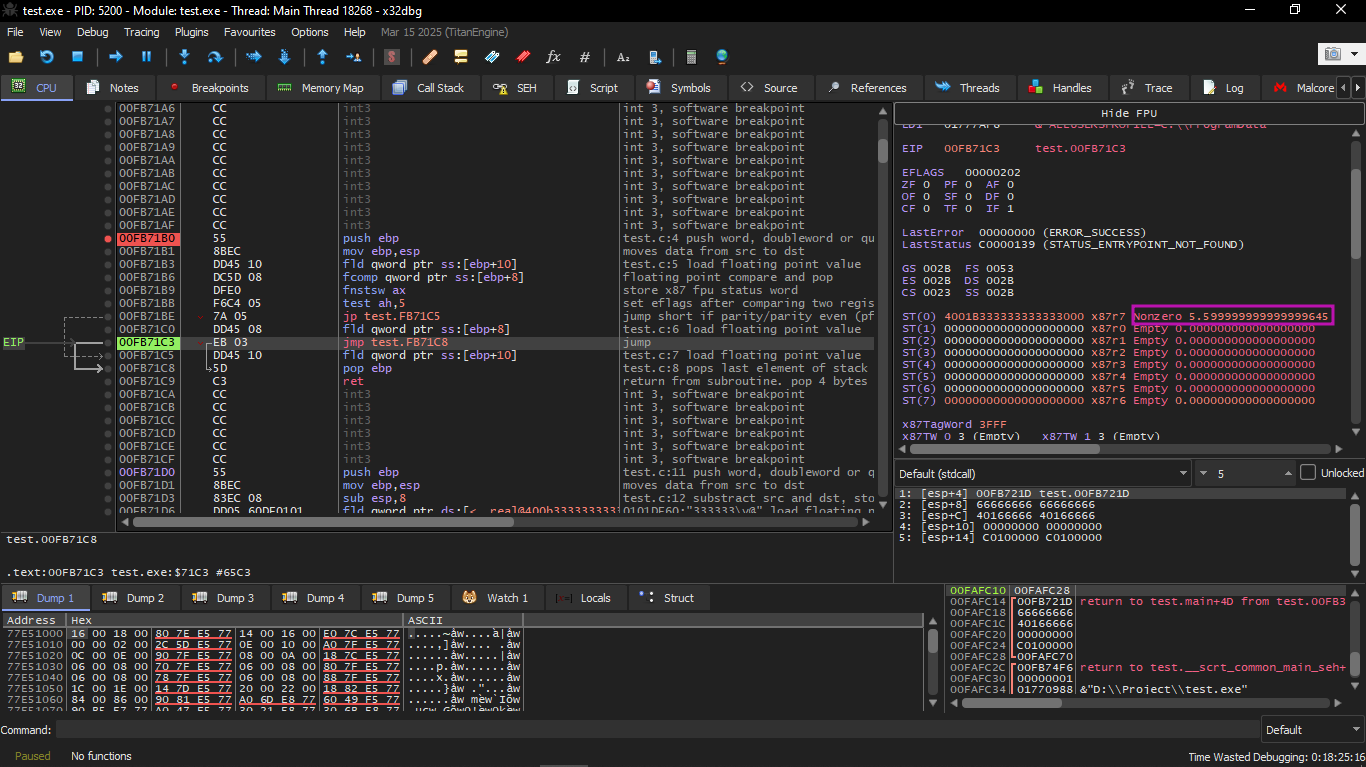
JPE is now skipped (does not execute). And since JPE did not execute, FLD loaded the value a (5.6) into ST(0):
fpu_10

After that the function finishes.


Optimizing MSVC 2010

Assembly

_a$ = 8      ; size = 8 ; parameter a offset on stack
_b$ = 16     ; size = 8 ; parameter b offset on stack

_d_max PROC
    fld QWORD PTR _b$[esp-4]       ; load b into ST(0)
    fld QWORD PTR _a$[esp-4]       ; load a into ST(0), pushing b down to ST(1)

    ; current stack state:
    ; ST(0) = _a
    ; ST(1) = _b

    fcom ST(1)                     ; compare ST(0) (_a) with ST(1) (_b); sets C3/C2/C0 (no pop)
    fnstsw ax                      ; copy FPU status word into AX
    test ah, 65                    ; test C3 (bit 6) and C0 (bit 0) of AH; 65 = 01000001 binary
    jne SHORT $LN5@d_max           ; jump if not equal (b > a, or a == b)

    ; a > b: copy ST(0) to ST(1) and pop, leaving _a on top
    fstp ST(1)                     ; store ST(0) into ST(1) then pop; now ST(0) = _a

    ; current stack state:
    ; ST(0) = _a

    ret 0                          ; return with _a in ST(0)

$LN5@d_max:                        ; reached when b > a or a == b

    ; b > a: discard ST(0) (_a), leaving _b on top
    fstp ST(0)                     ; store ST(0) into itself (no-op), then pop; now ST(0) = _b

    ; current stack state:
    ; ST(0) = _b

    ret 0                          ; return with _b in ST(0)
_d_max ENDP


The FCOM instruction differs from FCOMP in that it only compares the values without modifying the FPU stack.

Unlike the previous example, here the operands are coming in reverse order, and therefore the comparison result in the C3/C2/C0 bits is different:

* if a > b in our example, then C3/C2/C0 bits will be: 0, 0, 0

* if b > a, then the bits will be: 0, 0, 1

* if a = b, then the bits will be: 1, 0, 0

The instruction:

Assembly

test ah, 65  ; AND AH with 01000001 (binary); isolates C3 (bit 6) and C0 (bit 0), ignores all others


Leaves only two bits β€” C3 and C0. Both will be zero if a > b, and in that case the JNE jump will not execute.

After that comes:

Assembly

FSTP ST(1)  ; store ST(0) into ST(1) then pop ST(0); leaves _a as the new ST(0)


This instruction copies the value in ST(0) to the operand, and also pops a value from the FPU stack. In other words: it copies ST(0) (which currently holds _a) and places it into ST(1). After that there will be two copies of _a at the top of the stack. Then one value is popped. In the end ST(0) contains _a, and the function finishes.


The conditional jump JNE executes in two cases:

* if b > a

* or if a = b

In that case:

Assembly

fstp ST(0)  ; store ST(0) into itself (no-op effectively), then pop; leaves _b as the new ST(0)


This will copy ST(0) into ST(0) itself (meaning it did nothing β€” like a NOP), and then one value is popped from the stack, so the top value in the stack (ST(0)) will become the value that was previously in ST(1) (which is _b). After that the function finishes.

The reason this instruction is used here is likely that the FPU has no other instruction that pops a value from the stack and discards it without copying it first.

GCC 4.4.1

Listing 1.216: GCC 4.4.1

Assembly

d_max proc near

b = qword ptr -10h          ; local variable b on stack
a = qword ptr -8            ; local variable a on stack

a_first_half  = dword ptr 8  ; low 32 bits of argument a
a_second_half = dword ptr 0Ch ; high 32 bits of argument a
b_first_half  = dword ptr 10h ; low 32 bits of argument b
b_second_half = dword ptr 14h ; high 32 bits of argument b

push ebp                            ; save base pointer
mov  ebp, esp                       ; set up stack frame
sub  esp, 10h                       ; allocate 16 bytes for local variables

; put a and b to local stack:
mov  eax, [ebp+a_first_half]        ; load low 32 bits of a into EAX
mov  dword ptr [ebp+a], eax         ; store low 32 bits of a to local slot

mov  eax, [ebp+a_second_half]       ; load high 32 bits of a into EAX
mov  dword ptr [ebp+a+4], eax       ; store high 32 bits of a to local slot

mov  eax, [ebp+b_first_half]        ; load low 32 bits of b into EAX
mov  dword ptr [ebp+b], eax         ; store low 32 bits of b to local slot

mov  eax, [ebp+b_second_half]       ; load high 32 bits of b into EAX
mov  dword ptr [ebp+b+4], eax       ; store high 32 bits of b to local slot

; load a and b to FPU stack:
fld  [ebp+a]                        ; push a onto FPU stack β†’ ST(0) = a
fld  [ebp+b]                        ; push b onto FPU stack β†’ ST(0) = b, ST(1) = a

; current stack state: ST(0) = b; ST(1) = a

fxch st(1)                          ; swap ST(0) and ST(1) β†’ ST(0) = a, ST(1) = b

; current stack state: ST(0) = a; ST(1) = b

fucompp                             ; compare a and b (unordered), pop both values from FPU stack
fnstsw ax                           ; copy FPU status word into AX (C3/C2/C0 land in AH)
sahf                                ; transfer AH bits into CPU flags: C0β†’CF, C2β†’PF, C3β†’ZF

setnbe al                           ; set AL = 1 if CF=0 and ZF=0 (meaning a > b), else AL = 0
test   al, al                       ; check if AL == 0

jz short loc_8048453                ; jump if AL == 0 (meaning a <= b), go load b

fld [ebp+a]                         ; a > b: load a into ST(0) to return it
jmp short locret_8048456            ; jump to return

loc_8048453:
fld [ebp+b]                         ; a <= b: load b into ST(0) to return it

locret_8048456:
leave                               ; restore stack frame
retn                                ; return (result is in ST(0))

d_max endp


The FUCOMPP instruction is roughly like FCOM, but it pops both values from the stack and handles not-a-numbers differently.

A few words about not-a-numbers.

The FPU can deal with special values called not-a-numbers or NaNs. These are things like infinity, the result of division by zero, etc. Not-a-numbers can be either quiet or signaling.

It is possible to continue working with quiet NaNs, but if anyone tries to perform any operation with signaling NaNs, an exception occurs.

The FCOM instruction raises an exception if any operand is a NaN. But FUCOM only raises an exception if any operand is a signaling NaN (SNaN).

The next instruction is SAHF (Store AH into Flags) β€” and this is a rare instruction in code that is not related to the FPU. 8 bits from AH are transferred to the first 8 bits of the CPU flags in the following order:
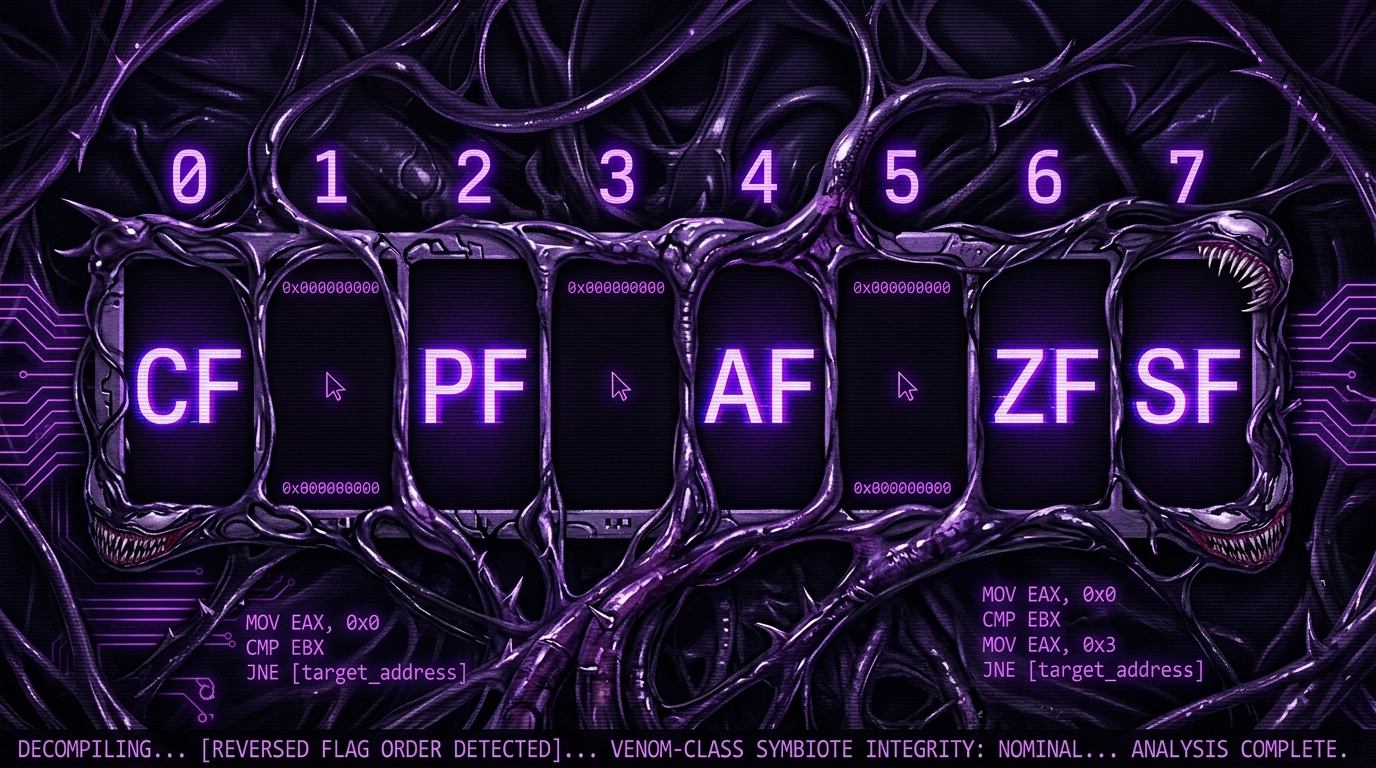
SAHF flags mapping

Let's recall that FNSTSW transfers the bits that matter to us (C3 / C2 / C0) into AH:

FNSTSW C3/C2/C0 in AH

And they are located at positions 6, 2, and 0 in register AH.

In other words, the pair of instructions:

Assembly

fnstsw ax  ; copy FPU status word into AX; C3β†’bit14(AH6), C2β†’bit10(AH2), C0β†’bit8(AH0)
sahf       ; copy AH into CPU flags; AH6β†’ZF, AH2β†’PF, AH0β†’CF


Transfer C3 / C2 / C0 into ZF, PF, CF.

Now let's recall the C3 / C2 / C0 values in the different cases:

If a > b in our example:

Text

C3 = 0
C2 = 0
C0 = 0


If a < b:

Text

C3 = 0
C2 = 0
C0 = 1


If a = b:

Text

C3 = 1
C2 = 0
C0 = 0


In other words, these CPU flag states are possible after the instructions:

Assembly

FUCOMPP  ; compare and pop both
FNSTSW   ; move FPU status to AX
SAHF     ; move AH into CPU flags

  
ConditionZFPFCF
a > b000
a < b001
a = b100

Based on the flag state and the conditions, the SETNBE instruction places 1 or 0 into AL. It is roughly the opposite of the JNBE instruction, but the difference is that SETcc places 1 or 0 into AL, while Jcc either jumps or does not.

SETNBE places 1 only if:

Text

CF = 0
ZF = 0


If this condition is not met, 0 is placed into AL.

The only case where both CF and ZF are 0 is when:

Text

a > b


In that case 1 is stored in AL, the JZ instruction that follows will not execute, and the function will return a. In all other cases, b is what will be returned.

Optimizing GCC 4.4.1

Listing 1.217: Optimizing GCC 4.4.1

Assembly

public d_max

d_max proc near

arg_0 = qword ptr 8   ; first argument (a) offset on stack
arg_8 = qword ptr 10h ; second argument (b) offset on stack

push    ebp                     ; save base pointer
mov     ebp, esp                ; set up stack frame

fld     [ebp+arg_0]             ; load a into ST(0)
fld     [ebp+arg_8]             ; load b into ST(0), pushing a down to ST(1)

; stack state now:
; ST(0) = _b
; ST(1) = _a

fxch    st(1)                   ; swap ST(0) and ST(1)

; stack state now:
; ST(0) = _a
; ST(1) = _b

fucom   st(1)                   ; compare ST(0) (a) with ST(1) (b); sets C3/C2/C0 (no pop)
fnstsw  ax                      ; copy FPU status word into AX
sahf                            ; transfer AH into CPU flags: C0β†’CF, C2β†’PF, C3β†’ZF

ja      short loc_8048448       ; jump if a > b (CF=0 and ZF=0)

; a <= b: discard ST(0) (a), leaving b on top
fstp    st                      ; store ST(0) into ST(0) itself (no-op), then pop; ST(0) = b
jmp     short loc_804844A       ; jump to return

loc_8048448:
; a > b: copy a to ST(1), pop ST(0), leaving a on top
fstp    st(1)                   ; store ST(0) (a) into ST(1), then pop; ST(0) = a

loc_804844A:
pop     ebp                     ; restore base pointer
retn                            ; return (result is in ST(0))

d_max endp


It is roughly the same thing, the only difference is that the JA instruction was used after SAHF. In fact, the conditional jump instructions that check for "greater", "less", or "equal" in unsigned number comparisons (such as these instructions):

Assembly

JA    ; jump if above (CF=0 and ZF=0)
JAE   ; jump if above or equal (CF=0)
JB    ; jump if below (CF=1)
JBE   ; jump if below or equal (CF=1 or ZF=1)
JE / JZ   ; jump if equal / zero (ZF=1)
JNA   ; jump if not above (CF=1 or ZF=1)
JNAE  ; jump if not above or equal (CF=1)
JNB   ; jump if not below (CF=0)
JNBE  ; jump if not below or equal (CF=0 and ZF=0)
JNE / JNZ ; jump if not equal / not zero (ZF=0)


Only check the flags:

Text

CF
ZF


Let's recall where the C3 / C2 / C0 bits are located in register AH after executing FSTSW / FNSTSW:

C3/C2/C0 in AH

Let's also recall how the bits from AH are stored into CPU flags after executing SAHF:

SAHF AH to CPU flags

After the comparison, the C3 and C0 bits are transferred into:

Text

ZF
CF


So that the conditional jump instructions can work after that. The JA instruction executes if CF = 0 and ZF = 0.

And thus, the conditional jump instructions mentioned above can work after the pair of instructions:

Assembly

FNSTSW  ; move FPU status word into AX
SAHF    ; move AH into CPU flags


It is clear that the FPU condition bits C3 / C2 / C0 were placed in those positions intentionally, so that they can be easily converted to regular CPU flags without needing additional operations to rearrange the bits.


GCC 4.8.1 with -O3 optimization

Some new FPU instructions were added in the Intel P6 family. These are FUCOMI (compares operands and sets the main CPU flags) and FCMOVcc (works like CMOVcc, but on FPU registers).

It is clear that the GCC developers decided to drop support for Intel processors older than P6 (old Pentiums, 80486, etc.). Also, the FPU is no longer a separate unit in the Intel P6 family, so it is now possible to modify or check the main CPU flags through the FPU.

So what we get is the following:

Listing 1.218: Optimizing GCC 4.8.1

Assembly

fld     QWORD PTR [esp+4]      ; load "a" into ST(0)
fld     QWORD PTR [esp+12]     ; load "b" into ST(0), pushing a down to ST(1)

; ST(0) = b, ST(1) = a

fxch    st(1)                  ; swap ST(0) and ST(1)

; ST(0) = a, ST(1) = b

fucomi  st, st(1)              ; compare ST(0) (a) with ST(1) (b), set CPU flags directly

; copy ST(1) (b) to ST(0) if a <= b, leave a in ST(0) otherwise
fcmovbe st, st(1)              ; conditional move: ST(0) = ST(1) if CF=1 or ZF=1 (a <= b)

fstp    st(1)                  ; discard ST(1) (now redundant copy), leaving result in ST(0)

ret                            ; return (result is in ST(0))


It is hard to guess why FXCH is present here. We could easily get rid of it by swapping the first two FLD instructions, or by replacing FCMOVBE (below or equal) with FCMOVA (above). This may be imprecision from the compiler.

FUCOMI compares ST(0) (a) and ST(1) (b) and then sets some flags in the main CPU.

FCMOVBE checks the flags and copies ST(1) (which is b here) into ST(0) (which is a here) if ST(0)(a) <= ST(1)(b). Otherwise (a > b) it leaves a in ST(0).

The last FSTP instruction leaves ST(0) at the top of the stack and discards the content of ST(1).

Let's trace this function in GDB:

Shell

dennis@ubuntuvm:~/polygon$ gcc -O3 d_max.c -o d_max -fno-inline  ; compile with O3, no inlining
dennis@ubuntuvm:~/polygon$ gdb d_max                              ; start GDB debugger
GNU gdb (GDB) 7.6.1-ubuntu
...
Reading symbols from /home/dennis/polygon/d_max...(no debugging symbols found)...done.

(gdb) b d_max                   ; set breakpoint at d_max
Breakpoint 1 at 0x80484a0

(gdb) run                       ; run the program
Starting program: /home/dennis/polygon/d_max

Breakpoint 1, 0x080484a0 in d_max ()

(gdb) ni                        ; step one instruction
0x080484a4 in d_max ()

(gdb) disas $eip                ; disassemble at current instruction pointer
Dump of assembler code for function d_max:

   0x080484a0 <+0>:  fldl   0x4(%esp)     ; load a
=> 0x080484a4 <+4>:  fldl   0xc(%esp)     ; load b (current position)
   0x080484a8 <+8>:  fxch   %st(1)        ; swap ST(0) and ST(1)
   0x080484aa <+10>: fucomi %st(1),%st    ; compare a with b, set CPU flags
   0x080484ac <+12>: fcmovbe %st(1),%st   ; conditional move if a <= b
   0x080484ae <+14>: fstp   %st(1)        ; discard ST(1)
   0x080484b0 <+16>: ret                  ; return

End of assembler dump.

(gdb) ni                        ; step one more instruction
0x080484a8 in d_max ()

(gdb) info float                ; display FPU register state
=> R7: Valid   0x4000d999999999999800 +3.399999999999999911   ; ST(0) = 3.4 (b), top of stack
   R6: Empty  0x4000d999999999999800                          ; previous value still in register
   R5: Empty  0x00000000000000000000
   R4: Empty  0x00000000000000000000
   R3: Empty  0x00000000000000000000
   R2: Empty  0x00000000000000000000
   R1: Empty  0x00000000000000000000
   R0: Empty  0x00000000000000000000

   Status Word:   0x3800           ; TOP field = 7 (top of stack points to internal register 7)
       TOP: 7
   Control Word:  0x037f IM DM ZM OM UM PM
   PC: Extended Precision (64-bits)
   RC: Round to nearest
   Tag Word:      0x3fff
   Instruction Pointer: 0x73:0x080484ae
   Operand Pointer:     0x7b:0xbffff118
   Opcode: 0x0000

(gdb) quit
A debugging session is active.

Inferior 1 [process 30194] will be killed.
Quit anyway? (y or n) y
dennis@ubuntuvm:~/polygon$


As mentioned before, the FPU register set is a circular buffer not a real stack. GDB does not display STx registers, but instead displays the internal FPU registers (Rx).

The arrow points to the current top of the stack. We can also see the value of the TOP register in the Status Word β€” it is 7 now, meaning the top of the stack currently points to internal register number 7.

The values of a and b were swapped after executing FXCH. The FUCOMI instruction was executed β€” we can see that CF is set. The FCMOVBE copied the value of b. The FSTP left one value at the top of the stack. The TOP value is now 7, so the top of the FPU stack points to internal register 7.


ARM

Optimizing Xcode 4.6.3 (LLVM) (ARM mode)

Listing 1.220: Optimizing Xcode 4.6.3 (LLVM) (ARM mode)

Assembly

VMOV    D16, R2, R3       ; load b from R2:R3 pair into D16
VMOV    D17, R0, R1       ; load a from R0:R1 pair into D17
VCMPE.F64 D17, D16        ; compare a (D17) with b (D16), set FPSCR flags
VMRS    APSR_nzcv, FPSCR  ; transfer 4 condition bits (N,Z,C,V) from FPSCR to APSR (CPU flags)
VMOVGT.F64 D16, D17       ; if a > b (GT condition true): copy a into D16
VMOV    R0, R1, D16       ; move result from D16 into R0:R1 pair for return
BX      LR                ; return


Very simple. The incoming values are placed in registers D17 and D16 and then compared with VCMPE.

Just like the x86 coprocessor, the ARM coprocessor has its own status register and flags (FPSCR), because it needs to keep condition flags specific to the coprocessor. And just like x86, there are no conditional jump instructions in ARM that can directly check the coprocessor flags. That is why there is the VMRS instruction that transfers 4 bits (N, Z, C, V) from the coprocessor status register to the general purpose register (APSR).

VMOVGT is like MOVGT but for D registers, and it executes only if the first value is greater than the second (GT = Greater Than). If it executes, the value of a will be copied into D16 (which originally held b). If not, b remains in D16.

The second-to-last instruction (VMOV) prepares the value in D16 to be returned via the R0:R1 pair.


Optimizing Xcode 4.6.3 (LLVM) (Thumb-2 mode)

Listing 1.221: Optimizing Xcode 4.6.3 (LLVM) (Thumb-2 mode)

Assembly

VMOV    D16, R2, R3        ; load b from R2:R3 pair into D16
VMOV    D17, R0, R1        ; load a from R0:R1 pair into D17
VCMPE.F64 D17, D16         ; compare a with b, set FPSCR flags
VMRS    APSR_nzcv, FPSCR   ; transfer condition bits from FPSCR to APSR
IT      GT                 ; if-then block: next instruction executes only if GT condition is true
VMOVGT.F64 D16, D17        ; (conditional) copy a into D16 if a > b
VMOV    R0, R1, D16        ; move result from D16 into R0:R1 pair for return
BX      LR                 ; return


Almost the same as before, but with a small difference. As we know, in ARM mode many instructions can have a predicate added to them. But in regular Thumb mode there is no space for that at all because instructions are 16-bit. However, Thumb-2 was extended to allow adding these conditions to some older instructions. In the listing produced by IDA, we see VMOVGT like before. In reality it is a regular VMOV, but IDA added the -GT suffix because there is an IT GT instruction immediately before it.

The IT instruction defines an "if-then" block. After it you can place up to 4 instructions, each with a condition suffix. In this example, IT GT means the instruction that follows will execute only if the GT condition is true.

A more complex example, from Angry Birds (iOS):

Listing 1.222: Angry Birds Classic

Assembly

...
ITE     NE              ; if-then-else: next two instructions get NE and EQ suffixes respectively
VMOVNE  R2, R3, D16    ; executes if NE (not equal) is true
VMOVEQ  R2, R3, D17    ; executes if EQ (equal) is true (inverse of NE)
BLX     _objc_msgSend  ; no condition suffix, always executes
...


ITE means if-then-else, and assigns suffixes to the next two instructions. The first executes if the condition (NE = Not Equal) is true, and the second executes if the condition is not true (the inverse of NE is EQ). The instruction after VMOVEQ is a normal instruction with no suffix (BLX).

Another slightly more complex example, also from Angry Birds:

Listing 1.223: Angry Birds Classic

Assembly

...
ITTTT   EQ              ; if-then-then-then-then: all 4 following instructions get EQ suffix
MOVEQ   R0, R4          ; executes if EQ
ADDEQ   SP, SP, #0x20   ; executes if EQ
POPEQ.W {R8,R10}        ; executes if EQ
POPEQ   {R4-R7,PC}      ; executes if EQ
BLX     ___stack_chk_fail ; no suffix, always executes
...


If it were for example ITEEE EQ, the suffixes would be: EQ, NE, NE, NE.

Another example from Angry Birds:

Listing 1.224: Angry Birds Classic

Assembly

...
CMP.W   R0, #0xFFFFFFFF    ; compare R0 with -1
ITTE    LE                  ; if-then-then-else: first two get LE suffix, third gets GT suffix
SUBLE.W R10, R0, #1        ; executes if LE: R10 = R0 - 1
NEGLE   R0, R0             ; executes if LE: R0 = -R0
MOVGT   R10, R0            ; executes if GT (inverse of LE)
MOVS    R6, #0             ; no suffix, always executes
CBZ     R0, loc_1E7E32     ; no suffix, always executes
...


ITTE (if-then-then-else) means the first and second instructions execute if LE is true, and the third executes if the inverse condition (GT) is true.

Compilers generally do not use all combinations. In Angry Birds (Classic version) only the following were used: IT, ITE, ITT, ITTE, ITTT, ITTTT.


Non-optimizing Xcode 4.6.3 (LLVM) (ARM mode)

Assembly

b               = -0x20   ; local slot for b
a               = -0x18   ; local slot for a
val_to_return   = -0x10   ; local slot for return value
saved_R7        = -4      ; saved frame pointer slot

STR     R7, [SP,#saved_R7]!     ; save R7 (frame pointer) on stack
MOV     R7, SP                  ; set frame pointer
SUB     SP, SP, #0x1C           ; allocate local stack space
BIC     SP, SP, #7              ; align stack to 8 bytes

VMOV    D16, R2, R3             ; load b from R2:R3 into D16
VMOV    D17, R0, R1             ; load a from R0:R1 into D17
VSTR    D17, [SP,#0x20+a]       ; store a to local stack slot
VSTR    D16, [SP,#0x20+b]       ; store b to local stack slot

VLDR    D16, [SP,#0x20+a]       ; reload a from local stack into D16
VLDR    D17, [SP,#0x20+b]       ; reload b from local stack into D17
VCMPE.F64 D16, D17              ; compare a with b, set FPSCR flags
VMRS    APSR_nzcv, FPSCR        ; transfer condition bits to APSR
BLE     loc_2E08                ; branch if a <= b

VLDR    D16, [SP,#0x20+a]       ; a > b: load a
VSTR    D16, [SP,#0x20+val_to_return] ; store a as return value
B       loc_2E10                ; jump to return

loc_2E08:
VLDR    D16, [SP,#0x20+b]       ; a <= b: load b
VSTR    D16, [SP,#0x20+val_to_return] ; store b as return value

loc_2E10:
VLDR    D16, [SP,#0x20+val_to_return] ; load return value from stack
VMOV    R0, R1, D16             ; move return value into R0:R1 pair

MOV     SP, R7                  ; restore stack pointer
LDR     R7, [SP+0x20+b],#4     ; restore saved R7
BX      LR                      ; return


Almost the same idea, but there is a lot of extra code because a and b were sent to the local stack, and even the value to be returned is also on the stack.


Optimizing Keil 6/2013 (Thumb mode)

Assembly

PUSH    {R3-R7,LR}      ; save registers and link register
MOVS    R4, R2          ; save low 32 bits of b in R4
MOVS    R5, R3          ; save high 32 bits of b in R5
MOVS    R6, R0          ; save low 32 bits of a in R6
MOVS    R7, R1          ; save high 32 bits of a in R7

BL      __aeabi_cdrcmple ; call library comparison function; sets flags based on result
BCS     loc_1C0          ; branch if carry set (a >= b), meaning b is not the max

; b >= a: return b
MOVS    R0, R6           ; load low 32 bits of a (wait β€” actually b was in R4/R5)
MOVS    R1, R7
POP     {R3-R7,PC}       ; restore and return

loc_1C0:
; a > b: return a
MOVS    R0, R4           ; load low 32 bits of result
MOVS    R1, R5           ; load high 32 bits of result
POP     {R3-R7,PC}       ; restore and return


Keil does not generate FPU instructions directly because it is not guaranteed that the target CPU has an FPU at all, and it cannot do a normal bitwise comparison. So it calls the external function __aeabi_cdrcmple to perform the comparison and leave the result in the flags, after which BCS (Carry Set = Greater or Equal) acts on it directly.


ARM64

Optimizing GCC (Linaro) 4.9

Assembly

d_max:
    fcmpe   d0, d1          ; compare D0 (a) and D1 (b), set APSR flags directly
    fcsel   d0, d0, d1, gt  ; if GT (a > b): D0 = D0 (keep a); else: D0 = D1 (take b)
    ret                     ; return (result is in D0)


In ARM64 there are now FPU instructions that set the flags in APSR directly instead of FPSCR, which is much more convenient.

FCMPE compares the two values in D0 and D1 and sets the flags in APSR. FCSEL (Floating Conditional Select) copies D0 or D1 into D0 based on the GT condition, and also uses APSR flags. Much more convenient than the old way.

If the GT condition is true β†’ D0 remains as it is (a). If not true β†’ D1 (b) is copied into D0.


Non-optimizing GCC (Linaro) 4.9

Assembly

d_max:
    sub     sp, sp, #16           ; allocate stack space
    str     d0, [sp,8]            ; save a to local stack
    str     d1, [sp]              ; save b to local stack

    ldr     x1, [sp,8]            ; reload a into x1
    ldr     x0, [sp]              ; reload b into x0

    fmov    d0, x1                ; move a into d0
    fmov    d1, x0                ; move b into d1

    fcmpe   d0, d1                ; compare a and b, set APSR flags
    ble     .L76                  ; branch if a <= b

    ; a > b: return a
    ldr     x0, [sp,8]            ; load a from stack
    b       .L74                  ; jump to return

.L76:
    ; a <= b: return b
    ldr     x0, [sp]              ; load b from stack

.L74:
    fmov    d0, x0                ; move result into d0 for return
    add     sp, sp, 16            ; deallocate stack
    ret                           ; return


The non-optimizing version is much more verbose and repetitive. It saves the inputs to the stack (Register Save Area), reloads them, converts them back to D-registers for comparison, then uses an old-style conditional branch (BLE) instead of the clean FCSEL.


Optimizing GCC (Linaro) 4.9 β€” float

If we change the function to use float instead of double:

C

float f_max (float a, float b) // same logic but with 32-bit float instead of 64-bit double
{
    if (a > b) return a;
    return b;
}


The code produced is:

Assembly

f_max:
    fcmpe   s0, s1          ; compare S0 (a) and S1 (b) using 32-bit float registers
    fcsel   s0, s0, s1, gt  ; if GT: keep a in S0, else copy b into S0
    ret                     ; return


Exactly the same idea, but using S-registers (32-bit) instead of D-registers (64-bit), because float is passed in S0 and S1.


MIPS

The coprocessor in MIPS has a condition bit that can be set in the FPU and read in the CPU. The old MIPS had only one bit (FCC0), the new one has 8 (FCC0 through FCC7), and these are in a register called FCCR.

Listing 1.227: Optimizing GCC 4.4.5 (IDA)

Assembly

d_max:
    c.lt.d     $f14, $f12      ; compare Less Than (double): if b < a, set condition bit (True)
    or         $at, $zero      ; NOP (branch delay slot filler)
    bc1t       locret_14       ; Branch if Condition 1 True: jump if b < a (a is greater)
    mov.d      $f0, $f12       ; delay slot: copy a into $f0 (always executes after bc1t)
    mov.d      $f0, $f14       ; if branch not taken (a <= b): copy b into $f0

locret_14:
    jr         $ra             ; return (result is in $f0)
    or         $at, $zero      ; NOP (delay slot)


c.lt.d compares Less Than for double. If b < a the condition bit is set (True). bc1t branches if Condition 1 is True (if the bit is set, jump). The delay slot is very important in MIPS β€” the instruction after the branch always executes.


1.25.8 Some constants

It is easy to find the representation of some constant numbers in IEEE 754 on Wikipedia. For example, 0.0 is represented by 32 zeros (float) or 64 zeros (double). This means that to zero a floating point variable in a register or in memory, it is possible to use MOV or XOR reg, reg. This is very useful in structures (structs) that contain many types, because with a single memset you can zero all integers to 0, booleans to false, pointers to NULL, and floats to 0.0.


1.25.9 Copying

One might think that FLD/FST must be used to copy IEEE 754 numbers, but in reality a regular MOV copies them bitwise just like any other data, and that is simpler and faster.


1.25.10 Stack, calculators and reverse Polish notation

Now we understand why old programmable calculators used Reverse Polish Notation (RPN). For example, to add 12 + 34, you enter 12, then 34, then press +. Because those calculators were stack machines, and that was much easier than dealing with parentheses and complex expressions. They are still present in many Unix distributions to this day: the program dc.


1.25.11 80 bits

The internal representation in the x86 FPU was 80-bit. A somewhat odd number since it is not a power of 2. There is a theory that this is due to historical reasons β€” the IBM card used in punching cards encoded 12 rows Γ— 80 columns. Also the 80Γ—25 text mode resolution was widespread back in those days.

This post is licensed under CC BY 4.0 by the author.

Trending Tags