



Global variables

The author asked here and said what will happen if the variable x in the previous example is not a local variable but a global variable?
At that time, it will be accessible from anywhere in the code, not just from inside the function body.
Global variables are considered an Anti-pattern, but for the experiment we can do that
#include <stdio.h> // include the standard I/O header - this includes the library for printf and scanf
// now x is a global variable - this declares x as a global integer, accessible from anywhereint x;
int main() // program entry point - this defines the main function{ printf("Enter X:\\n"); // print the prompt "Enter X:\n" - this displays a message to the user scanf("%d", &x); // read an integer into x - this calls scanf to read user input and store it in global x printf("You entered %d...\\n", x); // print "You entered %d...\n" with x - this displays the value stored in x return 0; // return success - this ends the program}MSVC: x86
_DATA SEGMENT COMM _x:DWORD ; define global variable x as DWORD - this declares x as a common (global) 32-bit variable $SG2456 DB 'Enter X:', 0Ah, 0 ; string "Enter X:\n" - this defines the prompt string with newline $SG2457 DB '%d', 0 ; string "%d" - this is the format for scanf $SG2458 DB 'You entered %d...', 0Ah, 0 ; string "You entered %d...\n" - this is the output format string_DATA ENDS
PUBLIC _main ; make main public - this declares main as a public procedureEXTRN _scanf:PROC ; external scanf procedure - this declares scanf as an external functionEXTRN _printf:PROC ; external printf procedure - this declares printf as an external function
_TEXT SEGMENT_main PROC ; start of main procedure push ebp ; save base pointer - this saves the caller's frame pointer mov ebp, esp ; set up new frame - this sets EBP to current ESP
; printf("Enter X:\\n"); push OFFSET $SG2456 ; push address of prompt - this pushes the prompt string address call _printf ; call printf - this calls printf to print the prompt add esp, 4 ; clean up stack - this removes the argument from stack
; scanf("%d", &x); push OFFSET _x ; address of variable - this pushes the address of global x push OFFSET $SG2457 ; "%d" - this pushes the format string call _scanf ; call scanf - this calls scanf to read input add esp, 8 ; clean up stack - this removes two arguments (8 bytes)
; printf("You entered %d...\\n", x); mov eax, DWORD PTR _x ; load x value - this loads the value of x into EAX push eax ; push value - this pushes the value of x push OFFSET $SG2458 ; push format - this pushes the output format string call _printf ; call printf - this calls printf to print the result add esp, 8 ; clean up stack - this removes two arguments
xor eax, eax ; return 0 - this sets EAX to 0 pop ebp ; restore base pointer - this restores the caller's frame pointer ret 0 ; return - this returns from main_main ENDP ; end of main procedure_TEXT ENDS ; end of text segmentIn this case, the variable x is defined in the _DATA segment and no memory is allocated for it in the local stack. It is accessed directly not through the stack.
Global variables that are not initialized do not take space in the executable file (why would you allocate space for variables set to zero anyway?), but as soon as someone accesses its address, the OS will allocate a block of zeros there.
Let’s write a value for variable X :
int x = 10; // default value - this initializes the global x to 10At that time it will come out
DATA SEGMENT_x DD 0aH ; initialized to 10 (0xA in hex) - this defines x as a DWORD with value 0xA (10 decimal)...
Here we see the value 0xA of type DWORD (DD = DWORD = 32-bit) for the variable.
If you open the .exe compiled in IDA, you will find the variable x placed at the beginning of the _DATA segment, and right after it the text Strings.
And if we open the .exe from the previous example in IDA, where x had no value, you will see something like this:
.data:0040FA80 _x dd ? ; DATA XREF: _main+10 - this is x, uninitialized (?).data:0040FA80 ; _main+22.data:0040FA84 dword_40FA84 dd ? ; DATA XREF: _memset+1E - another uninitialized dword.data:0040FA84 ; unknown_libname_1+28.data:0040FA88 dword_40FA88 dd ? ; DATA XREF: ___sbh_find_block+5 - another.data:0040FA88 ; ___sbh_free_block+2BC.data:0040FA8C lpMem dd ? ; DATA XREF: ___sbh_find_block+B - pointer to memory.data:0040FA8C ; ___sbh_free_block+2CA.data:0040FA90 dword_40FA90 dd ? ; DATA XREF: _V6_HeapAlloc+13 - another.data:0040FA90 ; __calloc_impl+72.data:0040FA94 dword_40FA94 dd ? ; DATA XREF: ___sbh_free_block+2FE - anotherx is marked with ? like the other variables that do not need initialization. This means that after the exe is loaded into memory, space will be allocated for all these variables and filled with Zeros (according to the C99 Standard). But inside the exe file itself, the uninitialized variables do not take any space. And this is very useful if you have large Arrays for example.
MSVC: x86 + OllyDbg

The author said that things here will be simpler I don't need to tell you again that I will do it on x32 dbg
So we start together like this insha'allah
First thing after we write the code in C and compile it we start opening its EXE file on the x32 dbg
Like every time we do we go to Symbols and choose the Main Function and it will come out like this
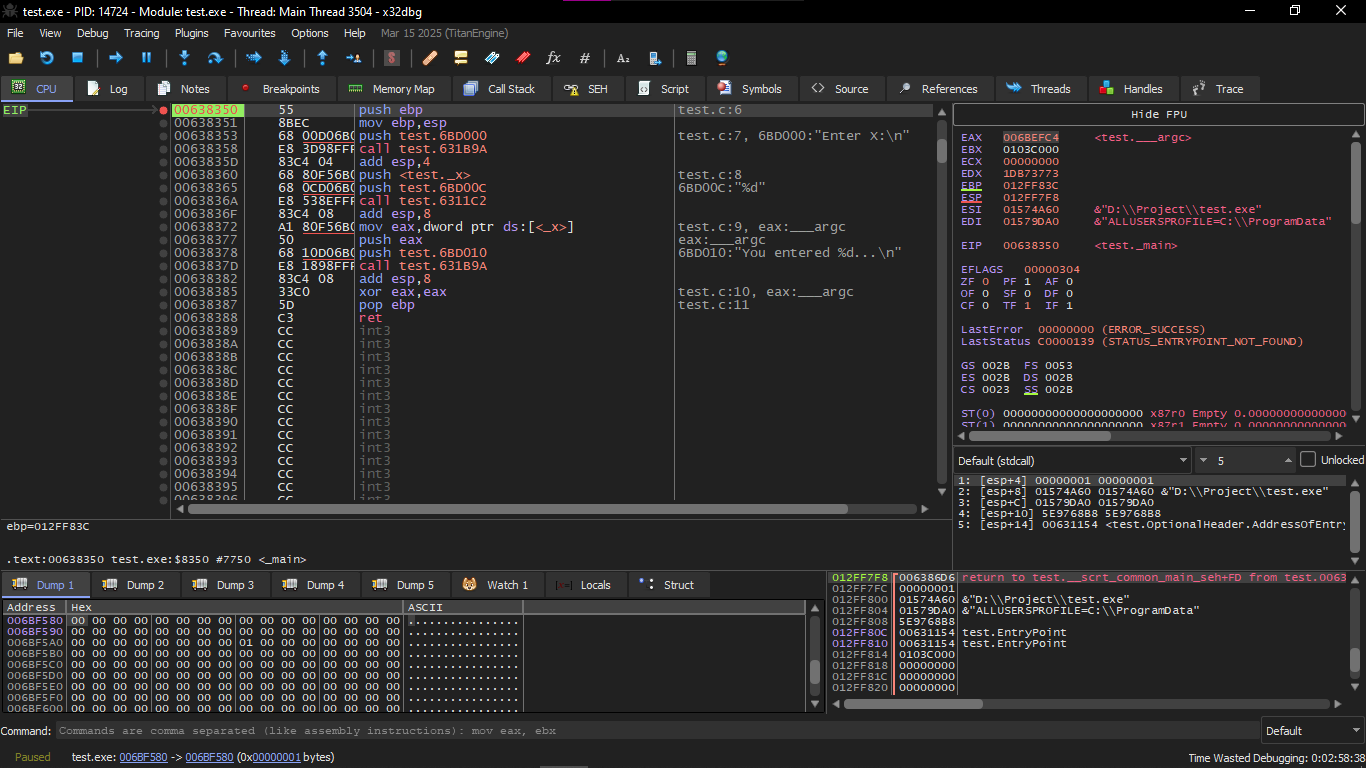
You will find variable X here in this Instruction Push test._x
To see it in the Dump and monitor its values we enter Symbols and then go to Search and search for _x
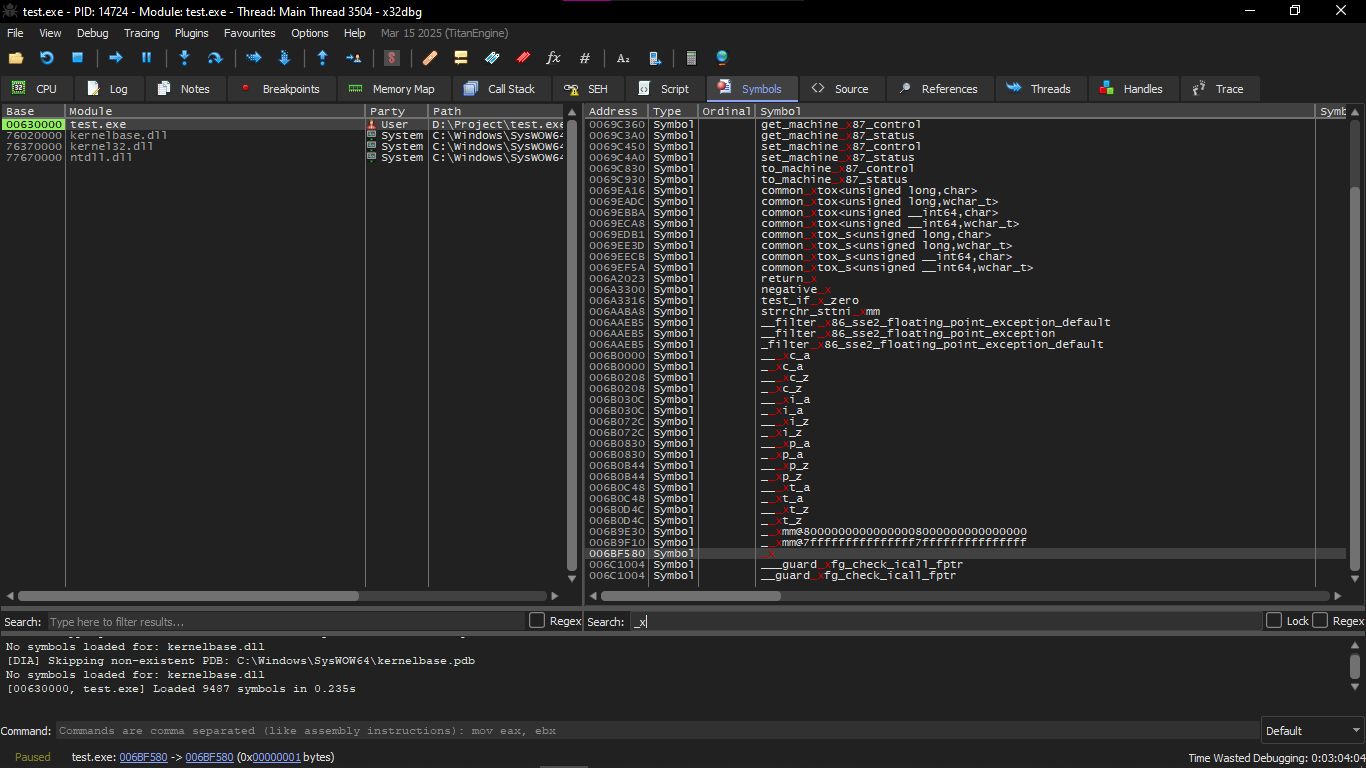
We double click on it and it will show that its value is still 0 because the global variable initialized to zero

After that we start running Scanf() and we make Breakpoint at call test.6311c2 and it will automatically open the Console for you and ask you to enter the value of X
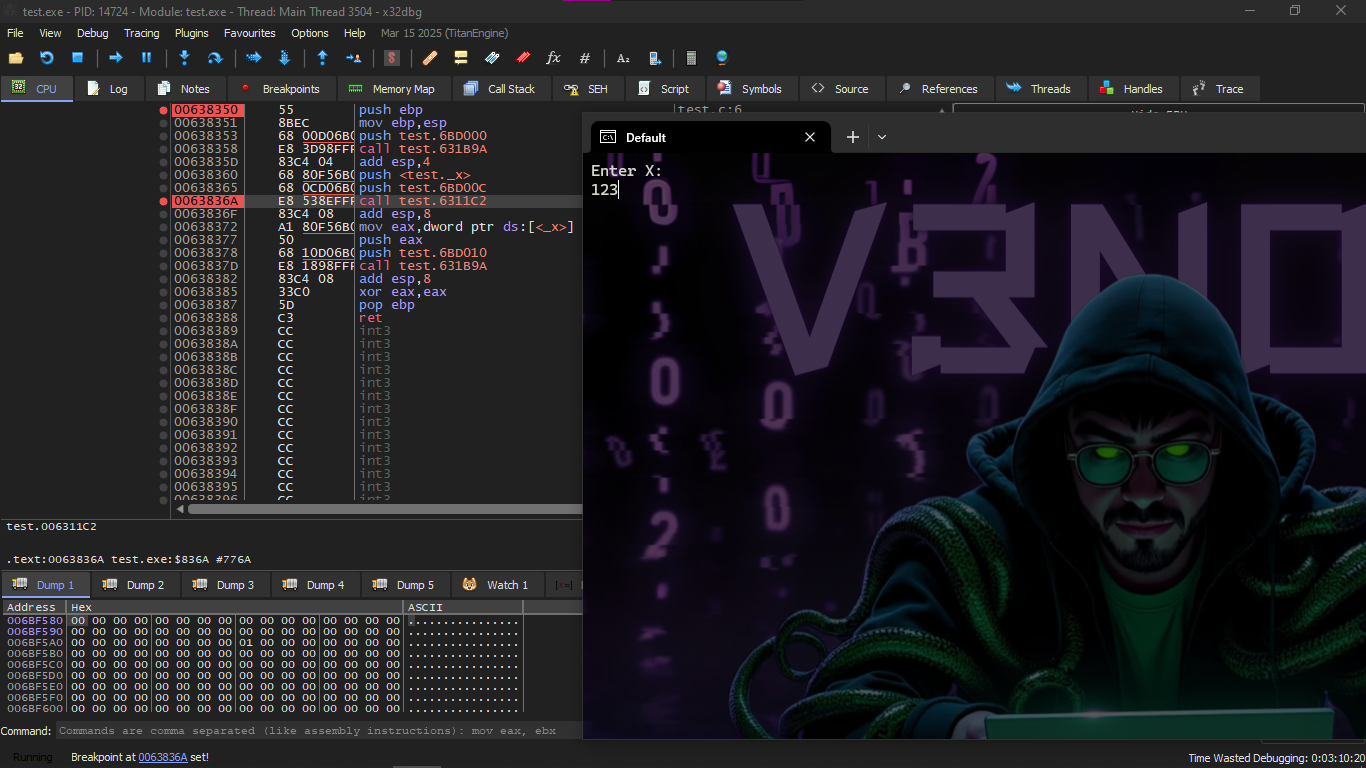
We will notice in the Dump that the value of X changed to 0x7B which is in DEC 123
GCC: x86
The situation in Linux is almost the same, with the difference that variables that are not initialized are present in the _bss segment .
In an ELF file, this segment has these properties:
; type of segment: Uninitialized (not initialized)
; segment permissions: Read/Write (read/write)
But if you did initialization for the variable with a value for example 10, at that time it will be placed in _data segment ,
and this segment has the same properties:
; type of segment: Pure data
; permissions: Read/Write
MSVC x64
_DATA SEGMENTCOMM x:DWORD ; define global variable x as 32-bit - this declares x as a common (global) DWORD$SG2924 DB 'Enter X:', 0aH, 00H ; string for input prompt - this defines "Enter X:\n"$SG2925 DB '%d', 00H ; scanf format string - this is "%d"$SG2926 DB 'You entered %d...', 0aH, 00H ; string for printing - this is "You entered %d...\n"_DATA ENDS
_TEXT SEGMENTmain PROC ; start of main proceduresub rsp, 40 ; prepare the stack - this allocates 40 bytes on the stack (shadow space)
lea rcx, OFFSET FLAT:$SG2924 ; printf("Enter X:") - load address of prompt into RCXcall printf ; call printf - this prints the prompt
lea rdx, OFFSET FLAT:x ; address of variable x - load address of x into RDX (second arg)lea rcx, OFFSET FLAT:$SG2925 ; "%d" - load format into RCX (first arg)call scanf ; scanf("%d", &x) - call scanf to read input
mov edx, DWORD PTR x ; load value of x - move x's value into EDX (second arg for printf)lea rcx, OFFSET FLAT:$SG2926 ; "You entered..." - load format into RCXcall printf ; call printf - this prints the result
xor eax, eax ; return 0 - set EAX to 0add rsp, 40 ; restore stack - deallocate the 40 bytesret 0 ; return - return from mainmain ENDP ; end of main_TEXT ENDS ; end of text segmentThe code is almost exactly like that of x86.
Notice that the address of variable x is passed to scanf() using the LEA instruction,
but the value of the variable itself is passed to scanf() using MOV .
DWORD PTR is part of the Assembly language and has nothing to do with the machine code.
It is just an indicator that the data size is 32-bit and therefore the MOV must be written in the appropriate way
ARM: Optimizing Keil 6/2013 (Thumb mode)
Listing 1.79: IDA
.text:00000000 main ; start of mainPUSH {R4,LR} ; save registers - push R4 and LR onto stack
ADR R0, aEnterX ; printf("Enter X:") - load address of prompt into R0BL __2printf ; call printf - branch with link to printf
LDR R1, =x ; load address of variable x - load x's address into R1ADR R0, aD ; "%d" - load format into R0BL __0scanf ; scanf("%d", &x) - call scanf
LDR R0, =x ; load address of x - into R0LDR R1, [R0] ; load value of x - dereference to get value into R1ADR R0, aYouEnteredD___ ; "You entered..." - load format into R0BL __2printf ; call printf - print result
MOVS R0, #0 ; set R0 to 0 - return 0POP {R4,PC} ; restore registers - pop R4 and PC (return)The variable x is now global, so it is stored in another segment which is .data.
You might ask yourself now why the text strings are in the **.text** segment and this doesn't change? And why the variable x alone in .data ?
Because the variable's value changes, so it cannot be placed in a fixed place (ROM) but the strings are fixed, so they are placed in the code segment itself as well the code segment can be present inside ROM because these devices have limited capabilities.
And it doesn't make sense to store fixed data in RAM while we have ROM ready after that we will find a pointer to the variable x in the code segment, and all operations on the variable happen through this pointer this is because variable x may be placed in a place far from the code,
and the address must be saved next to the code because the LDR has a limited range:
- in Thumb you can reach something with a maximum of ±1020 bytes
- and in ARM-mode you can reach something with a maximum of ±4095 bytes
And therefore, the address itself must be placed next to the code.
And if the variable is made const, the compiler places it in .constdata
and the linker may place it with the code inside the ROM.
ARM64
Listing 1.80: Non-optimizing GCC 4.9.1 ARM64
.comm x,4,4 ; define global variable named x size 4 bytes - this declares x as a common (global) 4-byte variable with 4-byte alignment
.LC0:.string "Enter X:" ; string - this defines "Enter X:"
.LC1:.string "%d" ; scanf string - this is "%d"
.LC2:.string "You entered %d...\\n" ; printf string - this is "You entered %d...\n"
; ---------- main() ----------f5: ; function labelstp x29, x30, [sp, -16]! ; save FP and LR on the stack - store pair, decrement SP by 16add x29, sp, 0 ; FP = SP - set frame pointer
; printf("Enter X:")adrp x0, .LC0 ; load page address of .LC0 - get high bits of label addressadd x0, x0, :lo12:.LC0 ; add low 12 bits - complete address of stringbl puts ; call puts - branch with link to puts (optimized printf)
; scanf("%d", &x)adrp x0, .LC1 ; load page address of .LC1add x0, x0, :lo12:.LC1 ; complete "%d" addressadrp x1, x ; load page address of x - high bits of x's addressadd x1, x1, :lo12:x ; complete &xbl __isoc99_scanf ; call scanf - read input
; printf("You entered %d...", x)adrp x0, x ; load page address of xadd x0, x0, :lo12:x ; complete addressldr w1, [x0] ; load value of x - load 32-bit word from address into W1
adrp x0, .LC2 ; load page address of .LC2add x0, x0, :lo12:.LC2 ; complete format addressbl printf ; call printf - print result
mov w0, 0 ; return 0 - set W0 to 0
ldp x29, x30, [sp], 16 ; restore FP and LR - load pair, increment SP by 16ret ; return - return from functionMIPS
Uninitialized global variable
Now the variable x is global. We compile the executable file instead of object file and open it in IDA.
IDA shows the variable x in the .sbss segment of ELF (remember the Global Pointer?).
This is because the variable is not initialized at the beginning.
.text:004006C0 main: ; start of mainvar_10 = -0x10 ; local variablesvar_4 = -4
; ---------- Function prologue ----------lui $gp, 0x42 ; load upper immediate for GP - set high bits of GPaddiu $sp, -0x20 ; allocate stack frame - decrement SP by 32li $gp, 0x418940 ; set GP to specific value - complete GP addresssw $ra, 0x20+var_4($sp) ; save return address - store RA on stacksw $gp, 0x20+var_10($sp) ; save GP on stack - store GP
; ---------- puts("Enter X:") ----------la $t9, puts ; load address of puts - into T9lui $a0, 0x40 ; high bits of prompt addressjalr $t9 ; call puts - jump and link registerla $a0, aEnterX ; branch delay slot - load "Enter X:" in delay slot
; ---------- scanf("%d", &x) ----------lw $gp, 0x20+var_10($sp) ; restore GPlui $a0, 0x40 ; high bits of "%d"la $t9, __isoc99_scanf ; load scanf addressla $a1, x ; address of variable x - load &xjalr $t9 ; call scanfla $a0, aD ; branch delay slot → "%d" - load in delay slot
; ---------- printf("You entered %d...", x) ----------lw $gp, 0x20+var_10($sp) ; restore GPlui $a0, 0x40 ; high bits of formatla $v0, x ; address of x - into V0la $t9, printf ; load printf addresslw $a1, (x - 0x41099C)($v0) ; load value of x - from memory using offsetjalr $t9 ; call printfla $a0, aYouEnteredD___ ; branch delay slot - load format
; ---------- epilogue ----------lw $ra, 0x20+var_4($sp) ; restore RAmove $v0, $zero ; return 0 - set V0 to 0jr $ra ; return - jump to RAaddiu $sp, 0x20 ; branch delay slot - restore SP in delay slotAnd after IDA, we did listing with objdump and added comments.
004006c0 main: # ----------------------- # Function Prologue # -----------------------4006c0: 3c1c0042 lui gp,0x42 # load high part for Global Pointer - set upper 16 bits of GP4006c4: 27bdffe0 addiu sp,sp,-32 # prepare stack frame (-32 bytes) - allocate 32 bytes on stack4006c8: 279c8940 addiu gp,gp,-30400 # adjust gp to the correct point - complete GP value4006cc: afbf001c sw ra,28(sp) # save return address - store RA4006d0: afbc0010 sw gp,16(sp) # save gp on stack - store GP
# ----------------------- # call puts("Enter X:") # -----------------------4006d4: 8f998034 lw t9,-32716(gp) # load address of puts into t9 - from GOT4006d8: 3c040040 lui a0,0x40 # high part of string address4006dc: 0320f809 jalr t9 # call puts - jump and link4006e0: 248408f0 addiu a0,a0,2288 # (Delay Slot) load "Enter X:" - complete address
# ----------------------- # call scanf("%d", &x) # -----------------------4006e4: 8fbc0010 lw gp,16(sp) # restore gp4006e8: 3c040040 lui a0,0x40 # high part for "%d"4006ec: 8f998038 lw t9,-32712(gp) # load scanf address4006f0: 8f858044 lw a1,-32700(gp) # load address of variable x (the pointer) - from GOT4006f4: 0320f809 jalr t9 # call scanf4006f8: 248408fc addiu a0,a0,2300 # (Delay Slot) load "%d"
# ----------------------- # call printf("...", x) # -----------------------4006fc: 8fbc0010 lw gp,16(sp) # restore gp400700: 3c040040 lui a0,0x40 # high part for printf string400704: 8f828044 lw v0,-32700(gp) # load address of x - into V0400708: 8f99803c lw t9,-32708(gp) # load printf address40070c: 8c450000 lw a1,0(v0) # load value of x from memory - dereference400710: 0320f809 jalr t9 # call printf400714: 24840900 addiu a0,a0,2304 # (Delay Slot) load format printf
# ----------------------- # Function Epilogue # -----------------------400718: 8fbf001c lw ra,28(sp) # restore ra40071c: 00001021 move v0,zero # return 0400720: 03e00008 jr ra # return400724: 27bd0020 addiu sp,sp,32 # (Delay Slot) free the stack - restore SP
# ----------------------- # Alignment NOPs # -----------------------400728: 00200825 move at,at # NOP - no operation40072c: 00200825 move at,at # NOP - no operationIn the end we saw that the address of variable x is read from a buffer of size 64KB using GP and multiplying offset by negative.
And also we saw that the addresses of the three functions (puts / scanf / printf) are also taken from the same buffer using GP.
The GP points to the middle of the buffer, and the offset we see means that these functions and x's address are stored at the beginning of the buffer... and this makes sense because the code is originally small.
And another thing: at the end of the function there are NOPs (MOVE $AT,$AT instruction) to align the beginning of the next function on 16-byte boundaries.
Initialized global variable
Let's change our example by giving the variable x a default value:
int x=10; // default value - this initializes x to 10Now IDA shows that the x variable is residing in the .data section:
Listing 1.83: Optimizing GCC 4.4.5 (IDA)
; -------------------- main --------------------
.text:004006A0 main: ; start of main.text:004006A0 var_10 = -0x10 ; locals.text:004006A0 var_8 = -8.text:004006A0 var_4 = -4
.text:004006A0 lui $gp, 0x42 ; load GP high.text:004006A4 addiu $sp, -0x20 ; allocate stack.text:004006A8 li $gp, 0x418930 ; set GP.text:004006AC sw $ra, 0x20+var_4($sp) ; save RA.text:004006B0 sw $s0, 0x20+var_8($sp) ; save S0.text:004006B4 sw $gp, 0x20+var_10($sp) ; save GP
.text:004006B8 la $t9, puts ; load puts.text:004006BC lui $a0, 0x40 ; prompt high.text:004006C0 jalr $t9 ; puts - call puts.text:004006C4 la $a0, aEnterX ; "Enter X:" - load prompt
.text:004006C8 lw $gp, 0x20+var_10($sp) ; restore GP
; --- prepare high part of x address ---.text:004006CC lui $s0, 0x41 ; high part into S0
.text:004006D0 la $t9, __isoc99_scanf ; load scanf.text:004006D4 lui $a0, 0x40 ; format high
; --- add low part of x address ---.text:004006D8 addiu $a1, $s0, (x - 0x410000) ; complete &x into A1; now x address is in $a1
.text:004006DC jalr $t9 ; scanf - call scanf.text:004006E0 la $a0, aD ; "%d" - load format
.text:004006E4 lw $gp, 0x20+var_10($sp) ; restore GP
; --- load x value from memory ---.text:004006E8 lw $a1, x ; a1 = value of x - load x
.text:004006EC la $t9, printf ; load printf.text:004006F0 lui $a0, 0x40 ; format high.text:004006F4 jalr $t9 ; printf - call printf.text:004006F8 la $a0, aYouEnteredD___ ; "You entered %d...\n" - load format
.text:004006FC lw $ra, 0x20+var_4($sp) ; restore RA.text:00400700 move $v0, $zero ; return 0.text:00400704 lw $s0, 0x20+var_8($sp) ; restore S0.text:00400708 jr $ra ; return.text:0040070C addiu $sp, 0x20 ; restore SPWhy not in .sdata? Maybe it depends on a choice in GCC? Anyway, now x is in .data, and this is a global area in memory, and we can see how to deal with the variables there.
The address of the variable is formed using two Instructions. In our case they are LUI (Load Upper Immediate) and ADDIU (Add Immediate Unsigned Word).
And this is also the objdump listing for more precise examination:
004006a0 main:4006a0: 3c1c0042 lui gp,0x42 ; load GP high bits4006a4: 27bdffe0 addiu sp,sp,-32 ; allocate stack4006a8: 279c8930 addiu gp,gp,-30416 ; complete GP4006ac: afbf001c sw ra,28(sp) ; save RA4006b0: afb00018 sw s0,24(sp) ; save S04006b4: afbc0010 sw gp,16(sp) ; save GP4006b8: 8f998034 lw t9,-32716(gp) ; load puts4006bc: 3c040040 lui a0,0x40 ; prompt high4006c0: 0320f809 jalr t9 ; call puts4006c4: 248408d0 addiu a0,a0,2256 ; complete prompt4006c8: 8fbc0010 lw gp,16(sp) ; restore GP
; --- prepare high part of x address ---4006cc: 3c100041 lui s0,0x41 ; high part into S04006d0: 8f998038 lw t9,-32712(gp) ; load scanf4006d4: 3c040040 lui a0,0x40 ; format high
; --- add low part of x address ---4006d8: 26050920 addiu a1,s0,2336 ; complete &x; address of x is now in a1
4006dc: 0320f809 jalr t9 ; call scanf4006e0: 248408dc addiu a0,a0,2268 ; complete "%d"4006e4: 8fbc0010 lw gp,16(sp) ; restore GP
; high part still in s0 → load x value4006e8: 8e050920 lw a1,2336(s0) ; load x value
4006ec: 8f99803c lw t9,-32708(gp) ; load printf4006f0: 3c040040 lui a0,0x40 ; format high4006f4: 0320f809 jalr t9 ; call printf4006f8: 248408e0 addiu a0,a0,2272 ; complete format
4006fc: 8fbf001c lw ra,28(sp) ; restore RA400700: 00001021 move v0,zero ; return 0400704: 8fb00018 lw s0,24(sp) ; restore S0400708: 03e00008 jr ra ; return40070c: 27bd0020 addiu sp,sp,32 ; restore SPWe see that the address is formed using LUI and ADDIU, but the high part of the address is still stored in the register S0, and this allows the offset to be encoded inside an Instruction of type LW (Load Word), and thus one Instruction of type LW is enough to load the value from the variable and pass it to printf().
The registers that hold temporary data have names starting with T, but here we also see some starting with S, and these are contents that must be saved before being used in another Function (meaning stored in another place).
And that's why the value of S0 was set at address 0x4006cc and used again at address 0x4006e8 after calling scanf(). And scanf() doesn't change its value.
scanf()
As we said before, using scanf() has become a bit old and not trendy now.
But if we have to use it, we must make sure thatscanf() finished correctly without Error.
#include <stdio.h> // include the standard I/O header
int main() // program entry point{ int x; // declare an integer variable x printf("Enter X:\\n"); // print prompt for user input
if (scanf("%d", &x) == 1) // read an integer into x and check if one field was successfully read printf("You entered %d...\\n", x); // print the entered value if successful else printf("What you entered? Huh?\\n"); // print error message if not successful
return 0; // return success}
According to the Standard, the scanf() function returns the number of fields it read successfully.
In our case, if everything is going correctly and the user entered a number → scanf() returns 1. And if there was an Error (or EOF) → it returns 0.
Come on, let's add a bit of C code to check the value that scanf() returned and print an Error message if there is a problem.
And this works as expected:
C:\\\\...>ex3.exe // run the executableEnter X: // prompt for input123 // user inputYou entered 123... // output if successful
C:\\\\...>ex3.exe // run the executable againEnter X: // prompt for inputouch // invalid user inputWhat you entered? Huh? // error outputMSVC: x86
Here is what we get in the assembly output (MSVC 2010):
lea eax, DWORD PTR _x$[ebp] ; load effective address of x into EAXpush eax ; push the address of x onto the stackpush OFFSET $SG3833 ; push the address of the format string "%d" onto the stackcall _scanf ; call the scanf functionadd esp, 8 ; clean up the stack by adding 8 bytes (two arguments)cmp eax, 1 ; compare the return value in EAX with 1jne SHORT $LN2@main ; jump if not equal to $LN2@main
mov ecx, DWORD PTR _x$[ebp] ; move the value of x into ECXpush ecx ; push the value of x onto the stackpush OFFSET $SG3834 ; push the address of "You entered %d..." onto the stackcall _printf ; call the printf functionadd esp, 8 ; clean up the stack by adding 8 bytesjmp SHORT $LN1@main ; jump to $LN1@main
$LN2@main: ; label for error casepush OFFSET $SG3836 ; push the address of "What you entered? Huh?" onto the stackcall _printf ; call the printf functionadd esp, 4 ; clean up the stack by adding 4 bytes
$LN1@main: ; label for endxor eax, eax ; set EAX to 0 (return 0)The function that is calling (main()) needs the result of the function that is called (scanf()),
So scanf() returns the result in the EAX register
Then we do a Check using the command: CMP EAX, 1 (meaning Compare).
Meaning we compare the value in EAX with the number 1.
After the CMP there is a conditional jump JNE.
JNE = Jump If Not Equal → jump if not equal.
So if the value in EAX is not 1, the CPU will go to the address in the JNE,
In our case: $LN2@main.
And when it jumps there, this makes the CPU execute printf() that prints:
"What you entered? Huh?"
But if everything is fine (meaning scanf returned 1),
Then the JNE is not taken, and the other message (You entered %d...) will be printed.
Since the second printf() function is not supposed to be executed if there was an Error,
You will find there is a JMP before it (unconditional jump).
And this transfers the execution to the point after the second printf
And before the command XOR EAX, EAX which is executing return 0.
So we can say that comparing a value with another value is often done through the pair:
CMP / Jcc
And cc means Condition Code.
CMP compares two values and sets the processor's flags.
Jcc looks at these flags and decides to jump or not.
And this might be a bit strange, but the CMP command is in fact SUB (subtraction).
All arithmetic commands change the flags, not just CMP.
If we compare 1 and 1 →
1 – 1 = 0 → then the ZF (Zero Flag) is set.
And there is no other case where ZF is set except if the two values were equal.
JNE looks only at ZF, and jumps if the flag is not set.
JNE is actually synonymous with JNZ (Jump If Not Zero).
The two names produce the same opcode.
So CMP can be replaced with SUB in most cases,
The only difference is that SUB changes the value of the first operand.
CMP = SUB but without storing the result — just changes the flags.
MSVC: x86: IDA
The author started to pave the way that it's time to explain on IDA and we will try to do some things together
And by the way, for beginners it's better that you use /MD in MSVC, and this means that all standard functions won't be linked inside the EXE file, but will be pulled from MSVCR.DLL instead.
And thus it will be easier for you to see any standard function being used and where.
We will start with the easiest one for you and we will do it together one by one and I will try to simplify the information as much as I can
First thing after we write the C code we need to Compile it with this Command:
cl /MD ex3.c /test.obj /test.exe ; compile ex3.c with /MD flag, output object to test.obj and executable to test.exe
This makes linking the standard functions from MSVCR.DLL and makes IDA analysis clearer
And we will start opening it on IDA and I chose Intel 80x86 Processors and from it choose MetaPC
And this is an extra thing just because I like to understand everything when I searched a bit on why MetaPc
- Supports the full x86 instruction set, from 8086 up to modern IA-32
- Compatible with Windows PE executables
- IDE and Decompiler (Hex-Rays) use it
- And it's what gives the same code shape as in the book

After that we press OK and IDA will open for us
I faced a problem that the Main Function didn't appear so when I searched a bit I will tell you how I reached it
You go to Strings either by going to View → Open subviews → Strings or press F12
And you will see the Strings that you wrote in the C code

And I will double click on Enter X:
It will start showing the main function

And while we analyze the code in IDA, it's very useful that you leave notes for yourself (and others).
Example: While analyzing this example, we find that the JNZ works in case of Error, so you can move the cursor to the label, press “n”, and name it error.
And then make another Label and name it exit.
And the code will be like this

If we pressed the Space button it will start displaying the code in Graph form

As you see you will find two arrows one of them green and this is if the condition is met while the red if the condition is not met
This topic is very useful.
We can say that a very important part of Reverse Engineering work is that you reduce the amount of information you deal with
MSVC: x86 + OllyDbg
We will try to Hack this program in X32 dbg, and make it think that scanf() always works without Error
We will start of course to do as we do every time until the main code appears to us
We will keep doing F8 until we reach the Call test.271110 then the Console will ask us to enter the value of X and suppose I entered the name V3n0m

And then we change the value of EAX to 1

Then the result will appear to me normally

MSVC: x86 + Hiew
Here is an explanation that we can Patch this program and bypass the check and so on but did it on Hiew I did it on x32 dbg and anyway the same idea
As we did the previous part all but what we will do extra we come to the instruction jnz 0x0027103A and we press on it and press Space from the keyboard and we make it Nop then the program will Skip it and work normally and continue like that

MSVC: x64
Since we are working here with variables of type int, which are still 32-bit in x86-64 architecture, we see that the 32-bit part of the registers (which is preceded by E-) is used here as well. But, when we work with pointers, we will find that the 64-bit parts of the registers are the ones being used, which are preceded by R-.
_DATA SEGMENT ; start of data segment $SG2924 DB 'Enter X:', 0aH, 00H ; define string "Enter X:" with newline and null terminator $SG2926 DB '%d', 00H ; define format string "%d" with null terminator $SG2927 DB 'You entered %d...', 0aH, 00H ; define string "You entered %d..." with newline and null terminator $SG2929 DB 'What you entered? Huh?', 0aH, 00H ; define string "What you entered? Huh?" with newline and null terminator_DATA ENDS ; end of data segment
_TEXT SEGMENT ; start of text segment x$ = 32 ; offset for variable x on stack main PROC ; start of main procedure$LN5: ; label sub rsp, 56 ; subtract 56 from RSP to allocate stack space lea rcx, OFFSET FLAT:$SG2924 ; load address of "Enter X:" into RCX call printf ; call printf to print the prompt lea rdx, QWORD PTR x$[rsp] ; load address of x into RDX lea rcx, OFFSET FLAT:$SG2926 ; load address of "%d" into RCX call scanf ; call scanf to read input cmp eax, 1 ; compare return value in EAX with 1 jne SHORT $LN2@main ; jump if not equal to $LN2@main (error case) mov edx, DWORD PTR x$[rsp] ; move value of x into EDX lea rcx, OFFSET FLAT:$SG2927 ; load address of "You entered %d..." into RCX call printf ; call printf to print success message jmp SHORT $LN1@main ; jump to $LN1@main
$LN2@main: ; label for error case lea rcx, OFFSET FLAT:$SG2929 ; load address of "What you entered? Huh?" into RCX call printf ; call printf to print error message
$LN1@main: ; label for end ; return 0 xor eax, eax ; set EAX to 0 add rsp, 56 ; add 56 to RSP to deallocate stack space ret 0 ; return from function
main ENDP ; end of main procedure_TEXT ENDS ; end of text segmentEND ; end of assemblyARM
ARM: Optimizing Keil 6/2013 (Thumb mode)
var_8 = -8 ; define stack offset for variable PUSH {R3,LR} ; push R3 and LR (link register) onto the stack ADR R0, aEnterX ; "Enter X:\\n" ; load address of "Enter X:\\n" into R0 BL __2printf ; branch with link to printf MOV R1, SP ; move SP (stack pointer) into R1 (address for input) ADR R0, aD ; "%d" ; load address of "%d" into R0 BL __0scanf ; branch with link to scanf CMP R0, #1 ; compare return value in R0 with 1 BEQ loc_1E ; branch if equal to loc_1E (success case)
ADR R0, aWhatYouEntered ; "What you entered? Huh?\\n" ; load address of error message into R0 BL __2printf ; branch with link to printf
loc_1A: ; CODE XREF: main+26 ; label, cross-reference from below MOVS R0, #0 ; move 0 into R0 (return value) POP {R3,PC} ; pop R3 and PC (return)
loc_1E: ; CODE XREF: main+12 ; label, cross-reference from CMP LDR R1, [SP,#8+var_8] ; load value from stack into R1 ADR R0, aYouEnteredD___ ; "You entered %d...\\n" ; load address of success message into R0 BL __2printf ; branch with link to printf B loc_1A ; branch to loc_1AThe new instructions here are CMP and BEQ
CMP
It is similar to the x86 instruction with the same name, subtracts one operand from the other and updates the conditional flags if necessary.
BEQ
Jumps to another address if the operands were equal to each other, or if the result of the last operation was 0, or if flag Z equals 1. Meaning it behaves like JZ in x86.
Everything else is simple: the execution behavior branches into two branches, and then the two branches intersect at the place where the value 0 is written in R0 as a return value from the function, and then the function ends.
ARM64
.LC0: ; label for string .string "Enter X:" ; define string "Enter X:".LC1: ; label for string .string "%d" ; define format string "%d".LC2: ; label for string .string "You entered %d...\\n" ; define string "You entered %d...\\n".LC3: ; label for string .string "What you entered? Huh?" ; define string "What you entered? Huh?"
f6: ; function label (main) ; save FP and LR in stack frame stp x29, x30, [sp, -32]! ; store pair X29 and X30 on stack, pre-decrement SP by 32
; set frame pointer FP to SP add x29, sp, 0 ; add 0 to SP and store in X29
: ; load address of "Enter X:" adrp x0, .LC0 ; load page address of .LC0 into X0 add x0, x0, :lo12:.LC0 ; add low 12 bits to get full address bl puts ; branch with link to puts
; load address of "%d" adrp x0, .LC1 ; load page address of .LC1 into X0 add x0, x0, :lo12:.LC1 ; add low 12 bits to get full address
; calculate address of x in local stack add x1, x29, 28 ; add 28 to X29 and store in X1 bl __isoc99_scanf ; branch with link to scanf
; W0 ; check result returned by scanf in W0 cmp w0, 1 ; compare W0 with 1
; BNE means Branch if Not Equal ; if W0 != 1, branch to .L2 bne .L2 ; branch not equal to .L2
; load value of x from local stack ldr w1, [x29,28] ; load word from [X29+28] into W1
; %d...\\n" ; load address of "You entered %d...\\n" adrp x0, .LC2 ; load page address add x0, x0, :lo12:.LC2 ; add low bits bl printf ; branch with link to printf
;"What you entered? Huh?" ; skip error message code b .L3 ; branch to .L3
.L2: ; label for error ; "What you entered? Hu register: ; load address of error message adrp x0, .LC3 ; load page address add x0, x0, :lo12:.LC3 ; add low bits bl puts ; branch with link to puts
.L3: ; label for end ; ; return 0 mov w0, 0 ; move 0 into W0
;; restore FP and LR from stack ldp x29, x30, [sp], 32 ; load pair X29 and X30, post-increment SP by 32 ret ; returnThis code shows the use of CMP and BNE (Branch if Not Equal) instructions
MIPS
text:004006A0 main: ; start of main var_18 = -0x18 ; define stack offsets var_10 = -0x10 var_4 = -4
lui $gp, 0x42 ; load upper immediate into GP addiu $sp, -0x28 ; add immediate unsigned to SP (allocate stack) li $gp, 0x418960 ; load immediate into GP sw $ra, 0x28+var_4($sp) ; store word RA to stack sw $gp, 0x28+var_18($sp) ; store word GP to stack
la $t9, puts ; load address of puts into T9 lui $a0, 0x40 ; load upper immediate into A0 jalr $t9 ; puts ; jump and link register to puts
la $a0, aEnterX # "Enter X:" ; load address of "Enter X:" (branch delay slot) lw $gp, 0x28+var_18($sp) ; load word GP from stack lui $a0, 0x40 ; load upper immediate into A0 la $t9, __isoc99_scanf ; load address of scanf into T9 la $a0, aD # "%d" ; load address of "%d" jalr $t9 ; __isoc99_scanf ; jump and link to scanf
addiu $a1, $sp, 0x28+var_10 # branch delay slot ; add immediate to SP for address li $v1, 1 ; load immediate 1 into V1 lw $gp, 0x28+var_18($sp) ; load GP li $v1, 1 ; load 1 into V1 again lw $gp, 0x28+var_18($sp) ; load GP beq $v0, $v1, loc_40070C ; branch if equal to loc_40070C (success)
or $at, $zero # branch delay slot, NOP ; or zero (NOP) la $t9, puts ; load address of puts lui $a0, 0x40 ; load upper into A0 jalr $t9 ; puts ; jump to puts la $a0, aWhatYouEntered # "What you entered? Huh?" ; load error message (delay slot) lw $ra, 0x28+var_4($sp) ; load RA
move $v0, $zero ; move zero to V0 jr $ra ; jump register RA (return) addiu $sp, 0x28 ; add to SP (deallocate, delay slot)
loc_40070C: ; label for success la $t9, printf ; load address of printf lw $a1, 0x28+var_10($sp) ; load from stack into A1 lui $a0, 0x40 ; load upper into A0 jalr $t9 ; printf ; jump to printf la $a0, aYouEnteredD___ # "You entered %d...\\n" ; load success message (delay slot) lw $ra, 0x28+var_4($sp) ; load RA move $v0, $zero ; move zero to V0 jr $ra ; return addiu $sp, 0x28 ; deallocate stack (delay slot)The scanf() returns its result in the $V0 register. It is checked at address 0x004006E4 by comparing the value in $V0 with the value stored in $V1 (which is 1). The BEQ instruction means "Branch Equal", meaning if the two values are equal (which is success of the operation), a transfer will occur to address 0x0040070C.
If this article helped you, please share it with others!
Some information may be outdated